Virtual Threads
1. Introduction
One of the great challenges of Java computing (and any programming language) has always been improving the utilization of the host machine resources where the virtual machine runs.
Traditionally, a Java thread needs to be carried by a Platform Thread (OS Thread) to be executed on a CPU. Creating platform threads is a very expensive process, so ThreadPools were introduced to maintain and reuse platform threads reserved at startup.
APIs and frameworks of asynchronous and reactive nature, based on the fork-and-join philosophy, achieved process optimization based on the “divide and conquer” mantra. Under this paradigm and with the help of the APIs, we could break down our operation into several subtasks (encapsulated in lambda functions) and thus manage the thread pool and distribute available threads among all those subtasks in an efficient manner.
This was a great advance in terms of performance and resource utilization, but its complexity for developers having to divide business logic into a set of orchestrated subprocesses (Future APIs, CompletableFutures, synchronization blocks, debugging, etc…) is something that still pains us to implement and that we very likely use incorrectly.
VirtualThreads comes to achieve the same (or greater) performance that was achieved with reactive programming in terms of resource efficiency. It is also managed by a ForkJoinPool and therefore also works internally under Work-Stealing, but contrary to the reactive/asynchronous approach, the developer will not have to worry about orchestrating their processes and can write code sequentially (and more simply). Our code will run on the famous virtual threads, but the JVM is the one that will detect and manage the pool based on the blocks and runtime behaviors of our application.
The summary of JEP444
Summary Introduce virtual threads to the Java Platform. Virtual threads are lightweight threads that dramatically reduce the effort of writing, maintaining, and observing high-throughput concurrent applications
But first, let’s look at some history to understand the evolution…
2. Microprocessors and Operating Systems
To know the resources of a machine (Linux) we have a descriptor in the file /proc/cpuinfo.
This file has several blocks separated by a (blank line).
Each block gives us information about each core it has. (Remember that microprocessors can have one or several cores.)
$ cat /proc/cpuinfo

processor   : 0
vendor_id   : GenuineIntel
cpu family  : 6
model       : 154
model name  : 12th Gen Intel(R) Core(TM) i7-1265U
....
....

processor   : 1
vendor_id   : GenuineIntel
cpu family  : 6
model       : 154
model name  : 12th Gen Intel(R) Core(TM) i7-1265U
....
....

processor   : 2
vendor_id   : GenuineIntel
cpu family  : 6
model       : 154
model name  : 12th Gen Intel(R) Core(TM) i7-1265U
....
....
We find the same in Settings > “About” on my machine.

3. CORE
A core is a computation unit, meaning it executes instructions and calculations.
Cores are responsible for executing the instructions and calculations indicated by the Platform threads.
It performs the operation and returns, the thread is released and the processor moves to the next thread in the priority stack.
Concurrency and limits
From this we can deduce that the maximum number of simultaneous operations that a Microprocessor can perform is proportional to the number of cores it has.
4. PLATFORM THREADS
A thread is a grouping of instructions. Threads are prioritized and executed on the microprocessor cores.
The maximum number of threads that a host can handle simultaneously (in Unix environments) is found in the descriptor /proc/sys/kernel/threads-max
These threads are shared among all processes on the host machine; that is, among those needed by the Operating System, programs we run in parallel, etc…The number of threads that a process is using on the machine can be found by executing this command:
Each running thread on a Linux OS creates a folder in /proc/To know the number of system threads that a process is using:
and to monitor it we use watch and it will refresh at each moment.5. JDK and the Host
Java provides us with information about the environment where the virtual machine is running.
The java.lang.Runtime and the MXBean can provide us with this information:
In this example, the number of cores on the host:
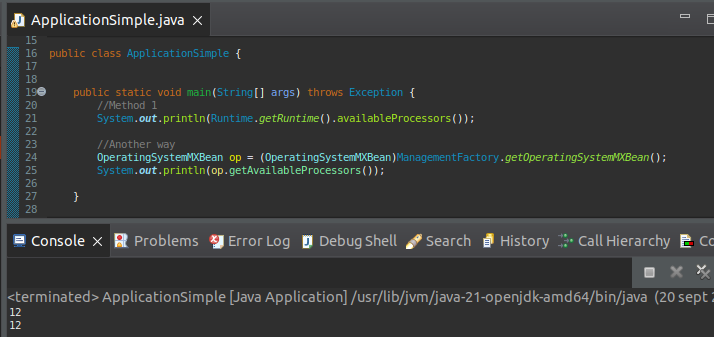
We see that it gives us the 12 cores we saw in the cat of /proc/cpuinfo
The JDK at runtime, based on the information received from the host where it is running, will adapt to calculate its internal processing (thread pool size, garbage collector cycles, etc..)
ActiveProcessorCount
If we wanted to indicate to the JVM to scale down to make less use of cores (for example in an embedded system we don’t want it to overuse resources to avoid saturating the host) we can indicate the parameter -XX:ActiveProcessorCount=2.
6. Java Thread
A Java process is the execution of a Java program on an operating system.
A Java Thread is a chain of instructions.
The JVM is responsible for passing (with its priority and rules) to the OS the threads (executions) it wants to perform on its OS Thread (processor).
All threads of the same process (in this case an execution of a Java program) share the resources and memory used.
7. Major Problems to Solve
As we have seen, a Java thread is a wrapper of an OS thread. When a Java thread is created, the JVM asks the OS to create a native thread to be able to run the Java thread.
For an Operating System, a thread is an independent execution that belongs to a process.
Creating a native thread is an expensive process in time and memory usage:
- Memory reservation to store the execution stack. This amount of memory is fixed and locked until the platform thread finishes.
On a Linux x64 system, this amount of memory is 1MB. Every time we create a thread, 1MB is reserved, so there is a direct relationship between the machine’s memory and the number of threads we execute.
From this we can deduce that there is a proportional limitation, that is, if we create more simultaneous threads (x1MB) whose size occupies more than the host’s available memory, we will get an error.
Thread per Request Problem
Imagine a Tomcat that receives 1000 simultaneous requests, this would generate 10GB of Stack memory. We would saturate the system, especially if we think about containerized environments. This behavior is also known as thread bottleneck.
- Context Switching: Native operations to create and register the thread in the native thread pool and derived operations (order, priority, etc…)
Every time a core executes a Platform Thread it needs to point to a memory stack that belongs to the process that owns that thread.
As you can imagine, the more threads, the more context switching and orchestration, and the result is the opposite of what is desired: the more threads, the more OS saturation and therefore degradation in its behavior.
8. Mitigations (A bit of history)
Let’s recap how the evolution of Thread management has been throughout the history of JVMs.
Green Threads:
The initial JVM implementations (1.0 to 1.3) based their execution on the so-called Green Threads. These threads and their execution were entirely managed by the JVM.
The main thread of the process (Platform Thread) was unique and was used for managing all Java threads.
This management was inefficient in terms of concurrency, as it was not capable of running simultaneous tasks. Additionally, the blocking in the execution of one thread conditioned the entry into execution of the rest of the threads.
From version 1.2 onwards, the approach of basing Threads as wrappers of platform threads began, so that the JVM would start to benefit from multicore processors and enable thread concurrency management in applications.
Problems
This approach squeezed the Host’s power but still had the problem that the platform thread creation process was very expensive.
Executor Service (java 1.5) and Future:
Platform thread creation continued to be an expensive process as we have seen previously. So (although they already existed and there were libraries that implemented them) work began with the use of Thread Pools.
These Thread Pools were reserves of platform threads that were administered and maintained to accommodate the execution of Java Threads.
The introduction of programming with Futures over an ExecuteService pool was a big change in the traditional programming approach.
Problems
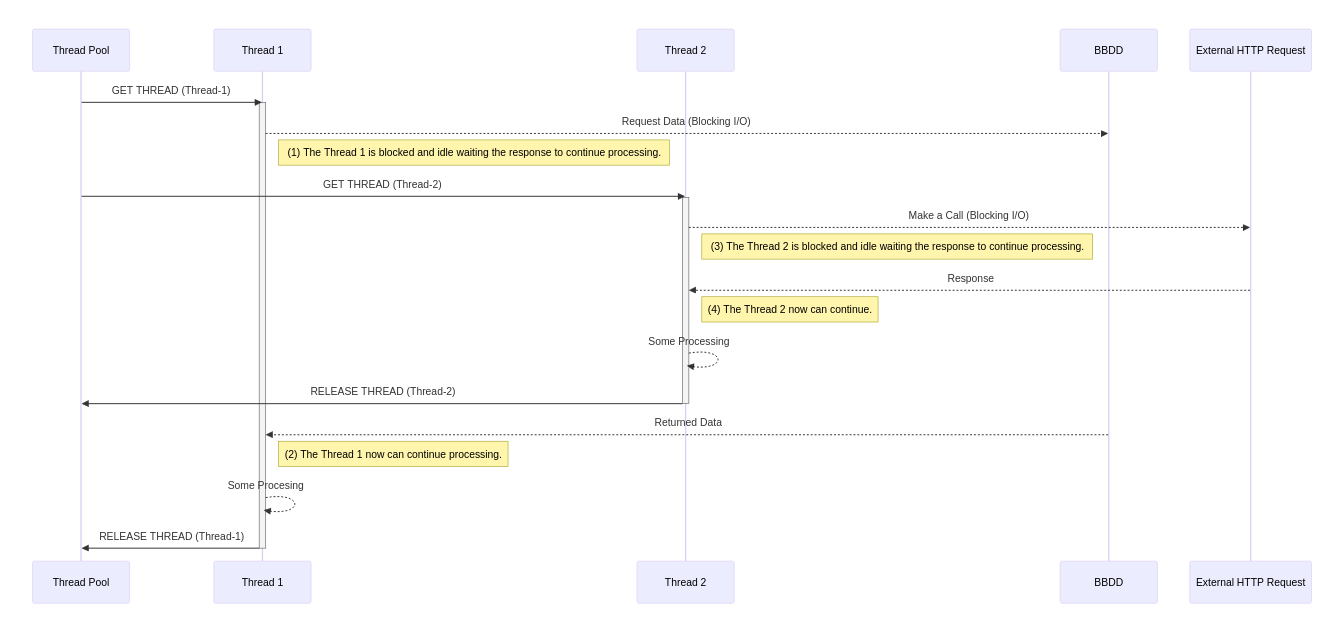
This was a great approach, but it still maintained a basic problem in thread execution, and this problem was that a thread that was in a blocked state (for example waiting for an I/O operation), remained blocking the platform thread for the rest of the executions and until it finished it could not be used by any other execution.
Imagine an incoming request that goes to the database and the database takes time to respond. Our thread will be using the platform thread doing absolutely nothing until we get the response from the database
ForkJoinPool (Java 1.7)
The ForkJoinPool manager introduced the concept of work-stealing.
ForkJoinPool is designed to optimize parallelism in a Fork-and-Join task approach. That is, dividing a task into smaller tasks that can run concurrently.
If you have programmed with the Future, CompletableFuture, WebFlux APIs, you will see that in the end you are writing many subtasks in the form of lambdas, these lambdas can be executed in different threads than the main one that initiated the task.
In the same thread we can divide tasks (fork) to gain computational capacity and subsequently combine the results to obtain the total result.
ForkJoinPool remains a ThreadPool manager of platform threads, but its thread management allows it to share pool threads among different subtasks, thus minimizing the cost that an execution would have in a blocking process and optimizing and rewarding the use of concurrent tasks.
CompletableFuture (java 1.8) plays a crucial role in ForkJoinPool management and gave rise to a wide variety of frameworks based on asynchronous and reactive programming that achieve very efficient management of system resources.
If we use its asynchronous API we see how in an execution chain Step1->thenAsync->Step2 the thread that started step1 does not have to be the thread that executes step2:
        for(int i=1; i <= 2; i++) {
            CompletableFuture.supplyAsync(() -> {
                System.out.println("Step 3 executor"+ Thread.currentThread().getName());
                return "A";
            }).thenAcceptAsync(step1Result -> {
                System.out.println("Step 4 executor"+ Thread.currentThread().getName());
                System.out.println("bienvenido "+step1Result);
            });
        }
Step 3 executorForkJoinPool.commonPool-worker-2
Step 3 executorForkJoinPool.commonPool-worker-1
Step 4 executorForkJoinPool.commonPool-worker-2
Step 4 executorForkJoinPool.commonPool-worker-3
bienvenido A
bienvenido A
Problems
Above all, complexity.
These processes require internal synchronization and developers need to adapt our code in a chain of well-balanced subtasks (CompletableFutures) to make optimal use of the ForkJoinPool. Internal management conditions how developers write our code, having to focus on the how as well as the what.
Error handling and process debugging is tedious and complicated.
9. Virtual Threads -Project Loom- (Java 21)
The Loom project (Virtual Threads) was born with the intention of replacing the operating system as the thread lifecycle manager, with the JVM now taking care of the thread stack memory management and orchestration.
By decoupling these tasks from the OS, it “will not be limited” by OS limitations.
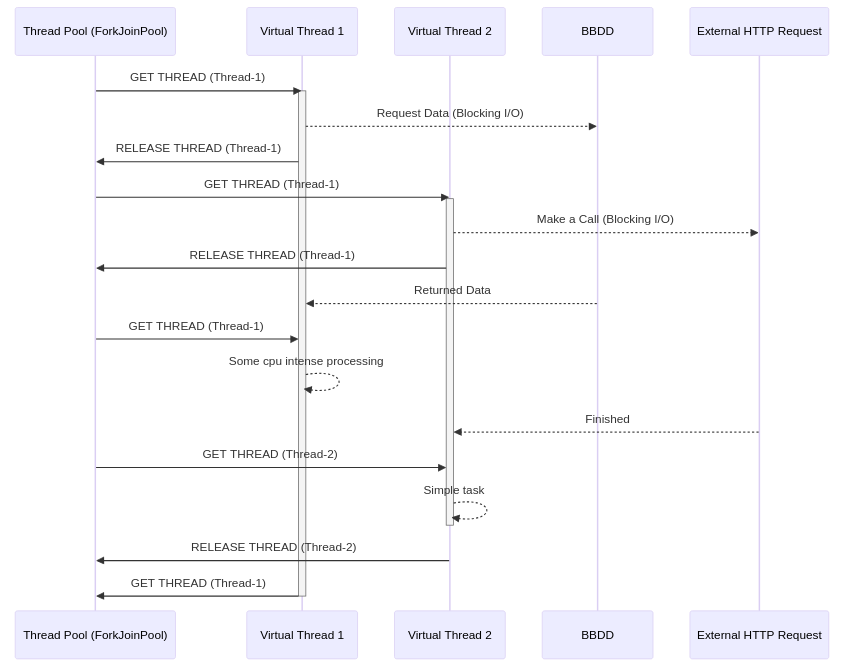
A Virtual Thread is essentially a Runnable Java Object. It still needs a platform thread (without platform threads there is no life), but those platform threads are shared among virtual threads.
The virtual thread stack is managed by the JVM in the Heap, so that Context Switching problems are now handled more efficiently by the JVM.
Problems
Since everything is managed in the heap, you can intuit that our virtual threads can saturate our process heap, you must be careful with your programming so that the GC can do its job correctly.
The change means that by the JVM managing the thread lifecycle, with few platform threads it is capable of accommodating a large number of Java threads. Its handling is also more efficient because a Virtual Thread is handled as a Java object itself.
Thread handling is also based on work-stealing, that is, when a VirtualThread is in a blocked state (I/O blocking) the JVM uses the same platform thread to execute other virtual threads, but since memory management is handled by the JVM, this process is no longer so expensive and limited.
For the handling of those Platform Threads, the ForkJoinPool engine is still used internally, but virtual Threads are managed internally.
When to use Virtual Threads
As you can deduce, Virtual Threads get the most benefit when our application has a high concurrency of I/O operations, such as database accesses, web requests, file access, etc…
That is, J2EE applications are the perfect candidates for using VirtualThreads.
When NOT to use Virtual Threads
In continuous computation operations there are no blocks and CPU usage is continuous and therefore I/O blocks do not occur and the use of virtual threads in this type of operations is “absurd”. A clear example is video, audio, etc. processing where there is a process that is making extensive use of a core and has no blocks in its execution.
synchronized blocks should not be used in Virtual Threads, as they block memory access and therefore the JVM will not be able to release the virtual thread.
Coding
Since the JVM handles thread orchestration and detects blocked processes, the developer no longer needs to write their code in a synchronized manner, nor blocking blocks, nor callbacks (reactive APIs) etc.... and can do it in the traditional sequential way (thread-sequential).
The debugging of these threads once again has the “usual” context which makes this task easier, which had become very tedious.
ThreadLocal: The use of context transport through ThreadLocal objects is discouraged in Virtual Threads, since we can have a large number of virtualThreads and therefore our ThreadLocal variables can end up saturating the Java heap.
10. SPRING BOOT Embedded Tomcat Benchmark
Context: A Spring Boot application that serves a REST API.
Each execution will have a sleep of 4 seconds, so the thread will be blocked for those 4 seconds and therefore will not be released nor can be reused.
We are going to test several implementations:
10.1 Tomcat embedded
By default it has a pool of 200 threads. https://docs.spring.io/spring-boot/appendix/application-properties/index.html#application-properties.server.server.tomcat.threads.max.
server.tomcat.threads.max -> Maximum amount of worker threads. Doesn’t have an effect if virtual threads are enabled. Default value 200.
By default, the ThreadPool reserved for Embedded Tomcat in a Spring Boot application is 200 Threads, which indicates 200 concurrent requests. In the usual model (Thread Per Request) we can handle up to 200 requests at a time, if we launch more they will wait until an execution thread can be assigned to them.
@RestController
@Slf4j
public class BlockingEndpoint{

    @GetMapping("/op")
    public ResponseEntity<String> doExtensiveOperation() {
        try {
            System.out.println(Thread.currentThread());
            Thread.currentThread().sleep(4000);

        } catch (InterruptedException e) {
            // TODO Auto-generated catch block
            e.printStackTrace();
        }

        return new ResponseEntity<String>("OK", HttpStatus.OK);
     }

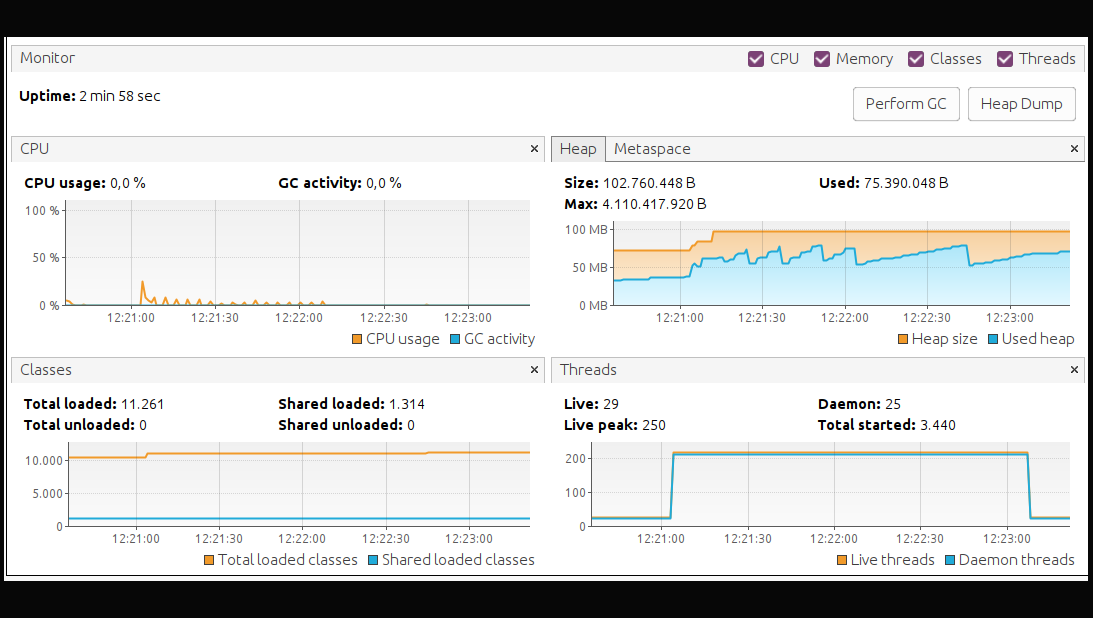
During this time it correctly processed 3200 requests and we see that some requests had high latency reaching 63 seconds, due to request queuing in the pool. It had a peak of 250 simultaneous threads and the Heap increase was not very large.
10.2 Virtual Threads
To use virtualThreads under Embedded Tomcat, it is enough to set the property:
And the Java code will be the same as the previous test.We launch the same 400 requests per second for one minute.

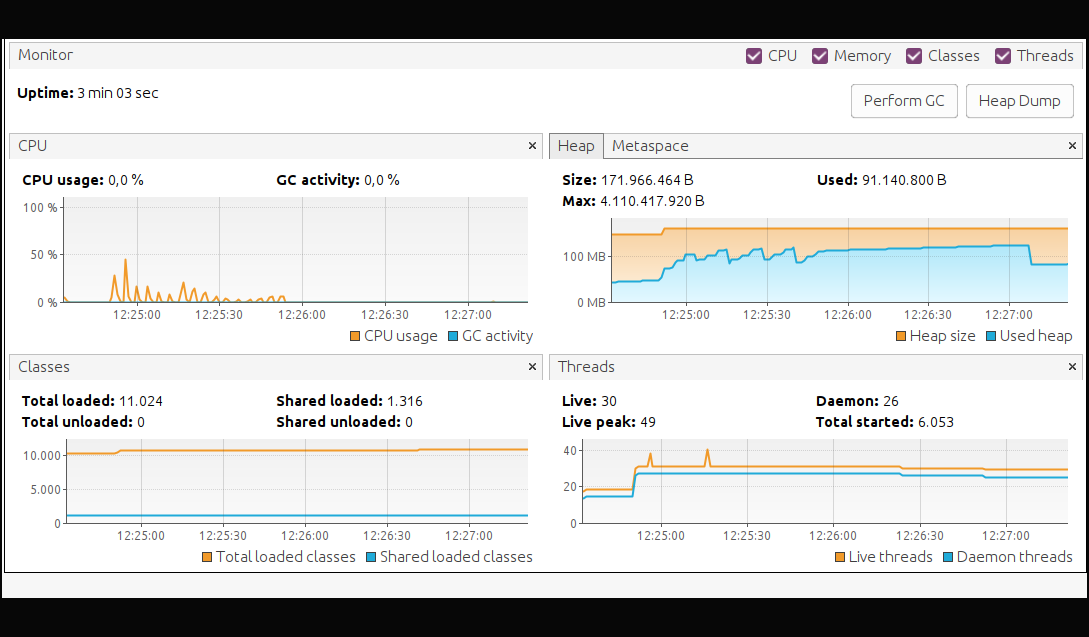
The results indicate that it processed 6000 requests, double the previous test. The latest request reached 5 seconds, meaning a latency of 1 second (since the first 4 were blocked by the code). And we see how the JVM Heap shot up to 91 MB. Even the heap reserve went to 171 MB, which is what we mentioned before, a Virtual Thread is a Java Object, therefore it lives in the heap.
10.3 WebFlux
We are going to prepare an endpoint that will wait for 4 seconds:
    @GetMapping("/op")
    public Mono<String> doExtensiveOperation() {

        return Mono.delay(Duration.ofMillis(4000)).map(duration->"OK");

    }

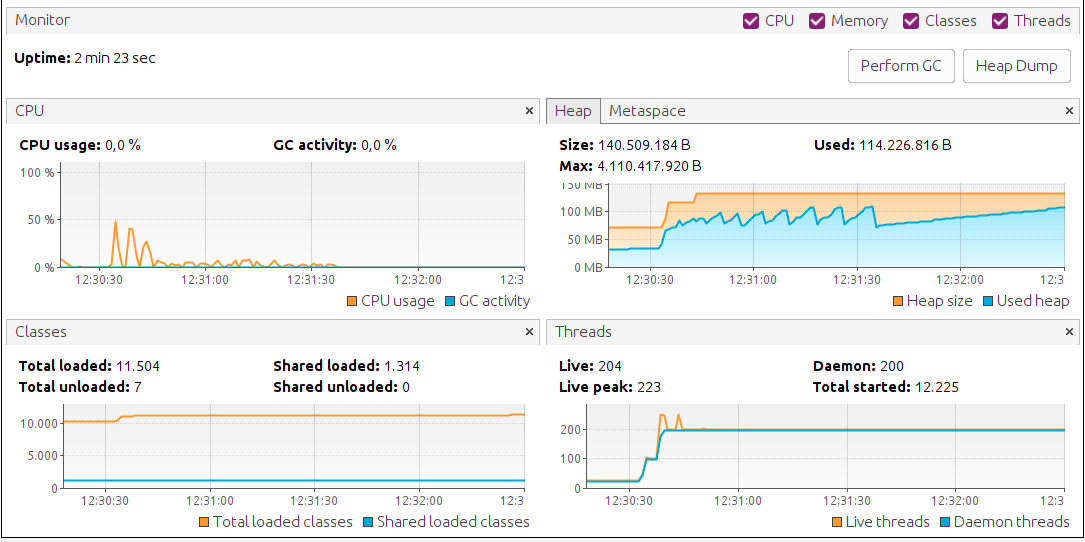
The results indicate that it achieved the same throughput as Virtual threads, 6000 requests. The latency in the worst case was only 2 seconds more than we expected, but we see it had a peak of 223 threads. The memory used also went to Virtual threads levels with a heap of 114 MB.
As we can see, the processing capacity in Reactive APIs is very good and similar to Virtual Threads, but on the contrary we see that it had to use 223 host threads while VirtualThreads better utilized resources using only 49.
HOWEVER, I CHEATED, so keep reading!!
As I mentioned before, in the test with WebFlux I used the Mono.delay API specific to the library for this purpose, but to play fair, logically my code should be like this, writing the malicious Thread.sleep:
@GetMapping("/op")
    public Mono<String> doExtensiveOperation() {

        return Mono.fromSupplier(()->{
            try {
                System.out.println(Thread.currentThread());
                Thread.currentThread().sleep(4000);
            } catch (InterruptedException e) {
                // TODO Auto-generated catch block
                e.printStackTrace();
            }
            return "OK";
        });
    }

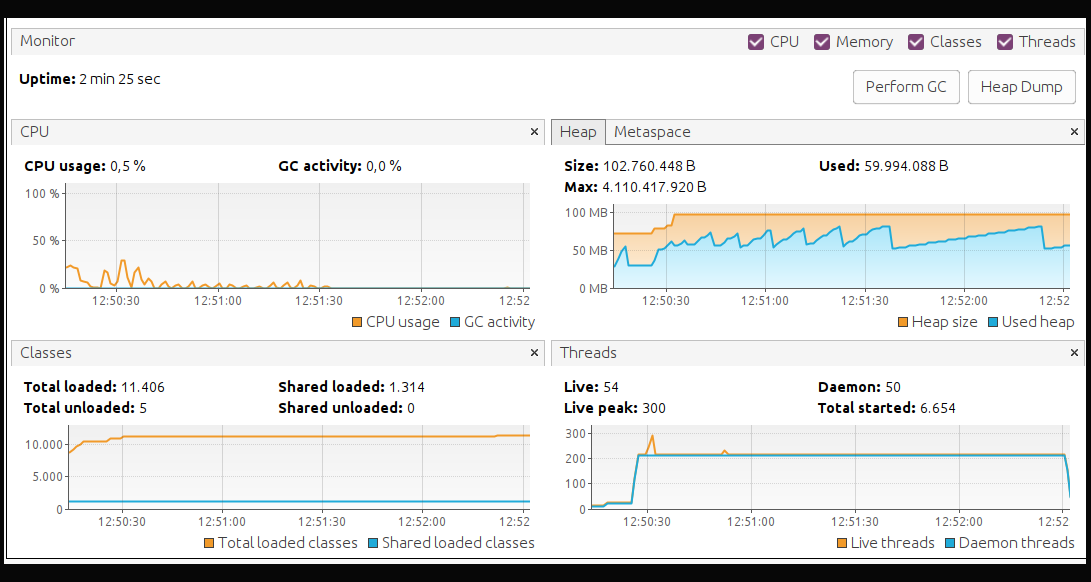
Now we find that the results are not so good and then we understand that:
-
To write our code in reactive and asynchronous mode we must know well what we are writing, not only the business logic, but also the how.
-
That Virtual Threads has allowed us to write our sloppy code and even so the JVM has been able to reassign threads when it has detected that there are blocks in the virtualThreads that were carrying that execution, thus improving the concurrency and performance of the application.
11. LIBRARIES AND FRAMEWORKS
Today many frameworks and libraries have been developed under an asynchronous approach, using synchronized blocks to improve their performance.
With the release of Virtual Threads there are many libraries and frameworks that will need to adapt their code to benefit from the use of virtual Threads.
Spring Boot: Started working on migration/adaptation to Virtual Threads.
https://spring.io/blog/2022/10/11/embracing-virtual-threads
Migrations are already available in Spring boot 3.2 within the Spring boot ecosystem, focused on web-based applications (Tomcat, Jetty). GUIDE
It is enough to set in application.properties:
This will internally use the Executors.newVirtualThreadPerTaskExecutor() implementation in engines that require an ExecutorService.Async Executions: If our code is written in asynchronous mode, there are several workarounds to continue managing it in “virtual thread” mode https://narasivenkat.medium.com/using-java-virtuals-threads-for-asynchronous-programming-29a3274e6294.
Spring Security: Spring’s security context uses ThreadLocal variables, which is not advisable in Virtual Threads. It works, but as I mentioned, it can saturate the heap. To solve the use of ThreadLocal, work is being done on ScopeValue [JEP-481 ScopedValue] (https://openjdk.org/jeps/481) which will be available in java 23. - https://stackoverflow.com/questions/78889090/alternative-of-threadlocal-for-virtual-threads
Reactor [WebFlux]: Loom comes to provide sequential programming but asynchronous treatment orchestrated by the JVM, and Reactor already did this explicitly in code. So, due to simplicity we should switch to Loom. Using Reactor instead of virtual thread would be in my opinion for something “specific”. Today there are attempts to adapt Reactor for the use of Virtual threads in its executors, to be able to continue maintaining code written in asynchronous format for Webflux. But as of today it is not officially supported. - https://github.com/reactor/reactor-core/issues/3084
Spring kafka Spring-Kafka 3.2.4 has limitations working with Virtual Threads, there are libraries - https://github.com/spring-projects/spring-boot/issues/36396 - https://github.com/spring-projects/spring-kafka/commit/ae775d804f82483f99d4cab2a16ef2b27649252a
Netty The adaptation of Netty is still in progress https://github.com/netty/netty/issues/8439
12. Conclusions
Well, VirtualThread comes to improve our day-to-day when programming, it will give spectacular performance to applications.
Today there is still a long way to go and adaptation work for libraries that need to jump on the VirtualThreads bandwagon.
And most importantly, tomorrow at the office coffee machine, you can look over the shoulder of those who haven’t yet read this post about virtual Threads. How does that make you feel?…
13. References
- [Official JEP 444] (https://openjdk.org/jeps/444)
- https://stackoverflow.com/questions/78318131/do-java-21-virtual-threads-address-the-main-reason-to-switch-to-reactive-single
- https://medium.com/@ajinkyav/java-21-virtual-threads-the-hype-is-real-514871521863#:~:text=Before%20going%20further%2C%20it%20is,virtual.
- https://spring.io/blog/2022/10/11/embracing-virtual-threads
- https://medium.com/@med.ali.bennour/enhancing-java-concurrency-processor-core-threads-fibers-0cac6000e5fb
-
https://engineeringatscale.substack.com/p/what-are-java-virtual-threads
-
https://blog.fastthread.io/pitfalls-to-avoid-when-switching-to-virtual-threads/
- https://medium.com/codex/java-virtual-threads-9fad6c362890
- https://stackoverflow.com/questions/77874865/kafka-consumer-on-virtual-threads-is-this-ok
- https://github.com/spring-projects/spring-kafka/issues/3074
- https://github.com/spring-projects/spring-kafka/commit/ae775d804f82483f99d4cab2a16ef2b27649252a
- https://github.com/spring-projects/spring-boot/issues/36396
- https://github.com/spring-projects/spring-kafka/issues/3074
- https://github.com/netty/netty/issues/8439