What is it, what is it for?
Maven is a system for managing dependencies and the lifecycle of software modules.
Thus Maven will help us to compile, build and distribute our code.
1. Installation
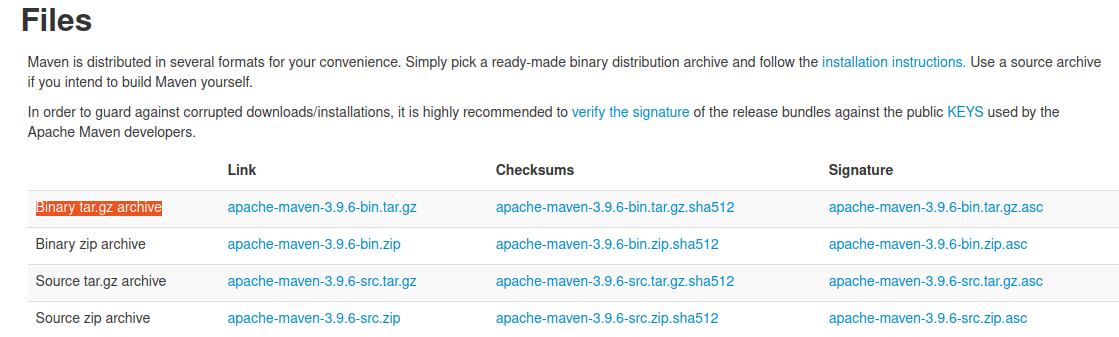
We go to the official maven page https://maven.apache.org/download.cgi and look for the distribution that fits our operating system.
We download the Binary tar.gz archive (which is the executable). We can also download the source code from the Source links if we wanted to.
# Download the distribution to a folder
cd ~/development/tools/maven
wget https://dlcdn.apache.org/maven/maven-3/3.9.6/binaries/apache-maven-3.9.6-bin.tar.gz

# Extract in the current folder
tar -xvf apache-maven-3.9.6-bin.tar.gz

# Delete the tar.gz file (we don't need it anymore)
rm ./apache-maven-3.9.6-bin.tar.gz
Once downloaded we must add it to our user’s PATH to be able to execute it freely.
On linux, we must modify our ~/.bashrc file and add it to the PATH
And we add the lines at the end of the file:
export M2_HOME=/home/myuser/development/tools/maven/apache-maven-3.9.6
export PATH=$M2_HOME/bin:$PATH
And we reload the bashrc (not necessary, if you open another console you will already have it reloaded)
And we verify that maven is now available
$ mvn -version
Apache Maven 3.9.6 (bc0240f3c744dd6b6ec2920b3cd08dcc295161ae)
Maven home: /home/dpena/development/tools/maven/apache-maven-3.9.6
Java version: 17.0.10, vendor: Private Build, runtime: /usr/lib/jvm/java-17-openjdk-amd64
Default locale: es_ES, platform encoding: UTF-8
OS name: "linux", version: "5.15.0-107-generic", arch: "amd64", family: "unix"
2. Configuration
By default our maven installation contains a /conf/settings.xml file that has configured the public Maven repositories (Maven Central artifactory), where the vast majority of dependencies we may need for our projects are located.
In case we want to use public repositories we should modify this file indicating what are the paths of the private repositories and the credentials if necessary.