MAVEN PLUGIN
1. Introduction
Maven is a tool for managing the entire lifecycle of software development.
The basic lifecycle of software consists broadly of some basic phases:
-
Creation: Provides support through Archetypes (these are templates to generate predefined software artifacts, giving us agility, speed and uniformity in our developments)
-
Compilation: Translation to machine language..
-
Installation: The generated code is packaged for distribution
-
Deployment: The code is distributed and executed
For these fundamental steps to take place, maven defines several phases and in each one of them it performs tasks that help the entire process.
As we can see, maven goes through many tasks throughout the lifecycle Offical Reference.
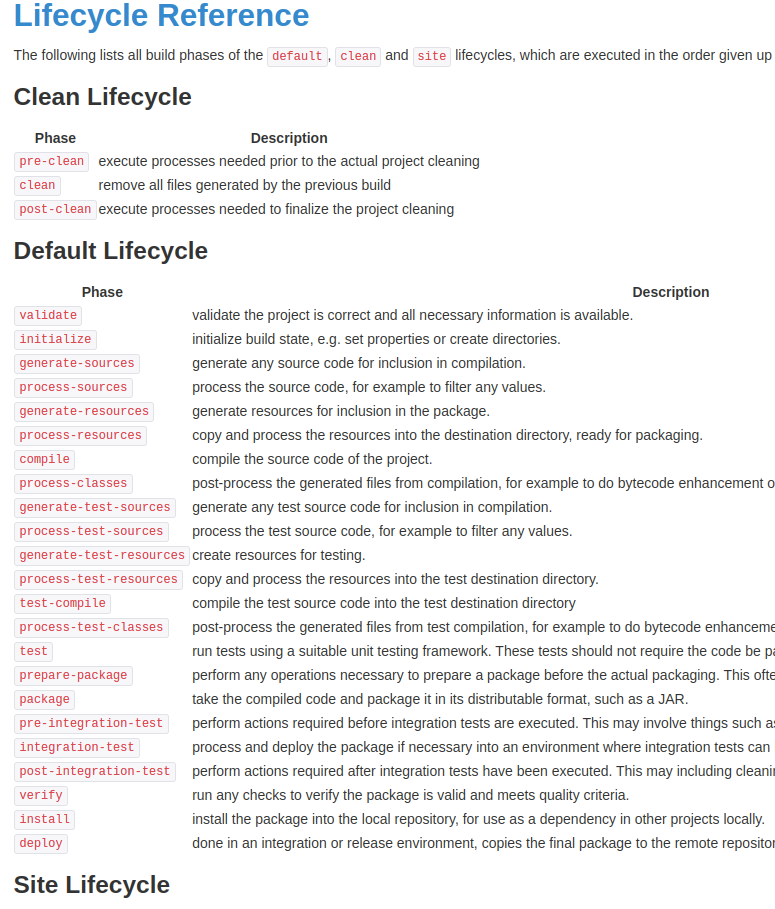
So we see that it is a chain of phases:
Every time we execute a task in maven (for example: “mvn test”), maven will go through all the previous phases until it reaches the indicated phase.
2. MAVEN PLUGIN
In each phase of the lifecycle, code is executed that performs a specific task. These execution encapsulations associated with a specific maven phase are grouped in what are called maven-plugins.
A maven plugin is nothing more than a fragment of code that is executed in a specific phase of the lifecycle.
You surely know maven-resources-plugin, maven-compiler-plugin, maven-assembly-plugin, maven-deploy-plugin, etc..
3. MAVEN AGENTS
As we have mentioned, Maven helps us in the software creation process. The software packaging phase is a crucial process, as it allows us to group code in a uniform way.
When we build software with Maven we only need an xml file called POM.XML (Project Object Model).
This file contains all the meta information that the maven tool needs to carry out all its lifecycle-related tasks.
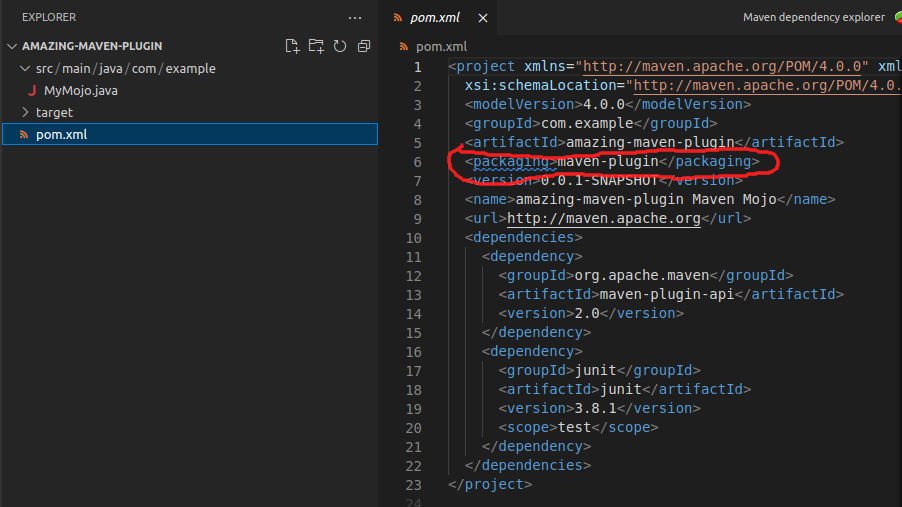
Within this file we find the information related to what will be the packaging mode of our software. It is found in the <packaging> tag
We know the value to create a software of type BOM, POM, JAR, WAR, EAR, etc…
To create and package a software of type maven plugin we will use
4. CREATING A MAVEN PLUGIN
As we have said, Maven helps us in the software creation process, so it offers us templates (maven archetypes) so that we can start the development of our software in an agile, fast and uniform way in our developments.
5. MAVEN-ARCHETYPE-MOJO
Maven offers us a standard archetype to start developing a software of type maven-plugin.
mvn archetype:generate  \
 -DgroupId=com.example  \
 -DartifactId=amazing-maven-plugin \
 -Dversion=0.0.1-SNAPSHOT  \
 -DarchetypeGroupId=org.apache.maven.archetypes   \
 -DarchetypeArtifactId=maven-archetype-mojo
It is important to mention that the name of your plugin must follow the nomenclature “\${pluginName}-maven-plugin” since the internal plugins of the maven core have nomenclature “maven-${pluginName}-plugin” (maven-compiler-plugin, maven-resources-plugin, etc..).
The Official Reference tells us this:
maven-${prefix}-plugin - for official plugins maintained by the Apache Maven team itself (you must not use this naming pattern for your plugin, see this note for more informations)
${prefix}-maven-plugin - for plugins from other sources
After the first execution of the archetype we obtain as a result:
A Maven software descriptor (POM) that indicates that it will be packaged as Maven-plugin and imports maven-plugin-api (which contains the Core classes of the maven-plugin-api)
A Java class that extends AbstractMojo (maven-plugin-api dependency) with some annotations in its javadoc and code to execute in its execute() method;
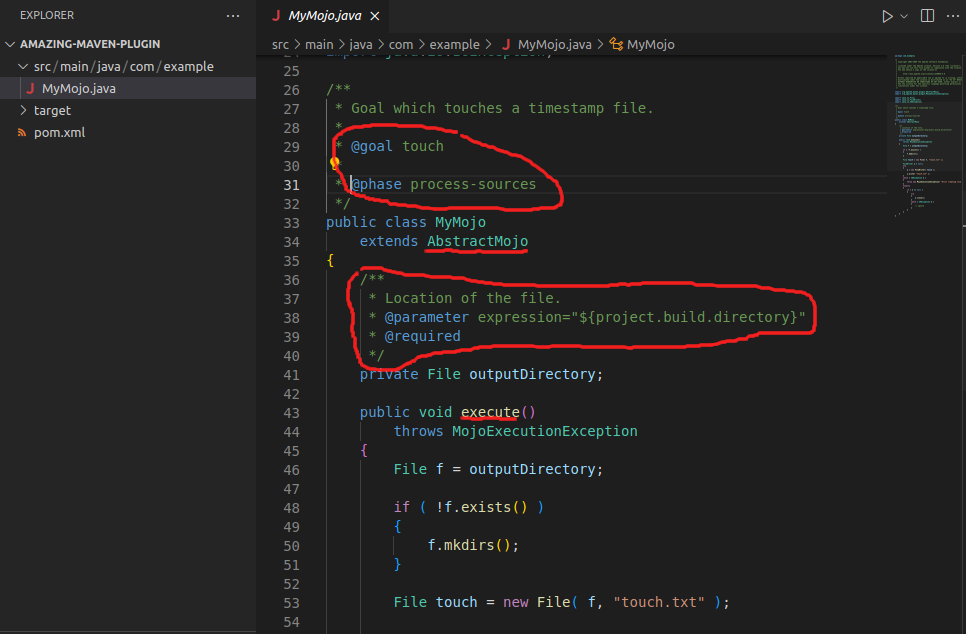
The generated source code is a plugin that will be executed in the @phase process-sources and that the name of this task (goal) is touch, that this plugin for its execution requires a parameter (outputDirectory) that will be resolved from the expression “${project.build.directory}” (directory of the project on which this plugin is acting).
If we look at the implementation of the execute method, it creates a file in the directory where it is located.
So we see that maven-archetype-mojo creates a plugin whose task called touch (goal) will be executed in the phase process-sources and that will create a file in the root directory of the project where it is executed.
6. MAVEN MOJO
As we can see, a task that is executed within a maven process is a MOJO (Maven plain Old Java Object), it is what we commonly know as a goal.
A maven-plugin, in this case amazing-maven-plugin can contain several MOJO (goals / tasks), each MOJO will be defined in its own java class.
That is, we could create other java classes in this project, give them a goal name and associate them with a maven phase and everything would be packaged in the same maven-plugin.
7. GHOSTS OF THE PAST
If we execute the build process of our maven plugin we will see that it fails:
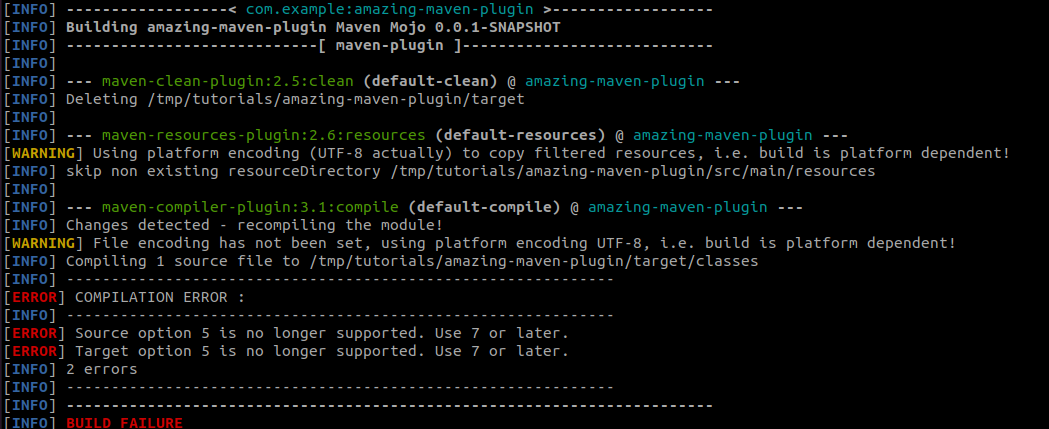
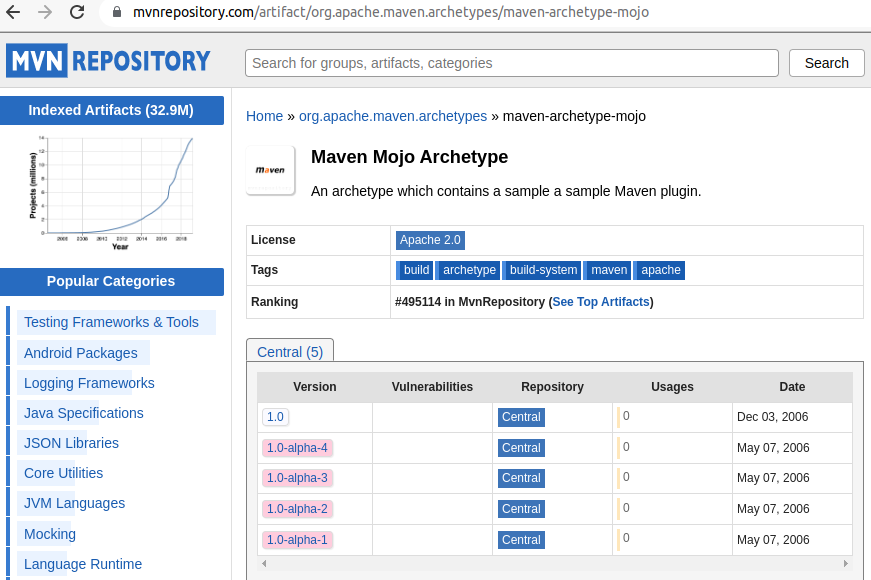
Sadly the last release of maven-archetype-mojo is from 2006.
7.1 MODIFICATIONS
Let’s upgrade it to JAVA 17, we add in the pom.xml:
    <properties>
        <maven.compiler.target>17</maven.compiler.target>
        <maven.compiler.source>17</maven.compiler.source>
    </properties>
I suppose you also found it strange that the definition of the phase and the name of the goal was inside a javadoc… In 2006 it surely made sense, but let’s give it a more current facelift and let’s use the @Mojo annotation We import the library to make use of the annotations:
        <dependency>
            <groupId>org.apache.maven.plugin-tools</groupId>
            <artifactId>maven-plugin-annotations</artifactId>
            <version>3.6.0</version>
            <scope>provided</scope>
        </dependency>
...
import org.apache.maven.plugin.MojoExecutionException;
import org.apache.maven.plugins.annotations.LifecyclePhase;
import org.apache.maven.plugins.annotations.Mojo;

/**
 * Goal which touches a timestamp file.
 */
@Mojo(name = "touch", defaultPhase = LifecyclePhase.PROCESS_CLASSES)
public class MyMojo extends AbstractMojo{

    public void execute() throws MojoExecutionException
    {
        this.getLog().info(" ----- I AM THE TOUCH EXECUTION -----");
    }
}
...
Remember in maven everything are MOJOs that are stored in plugins
With the above modifications if we execute mvn clean install we see that maven-plugin-plugin is being executed:
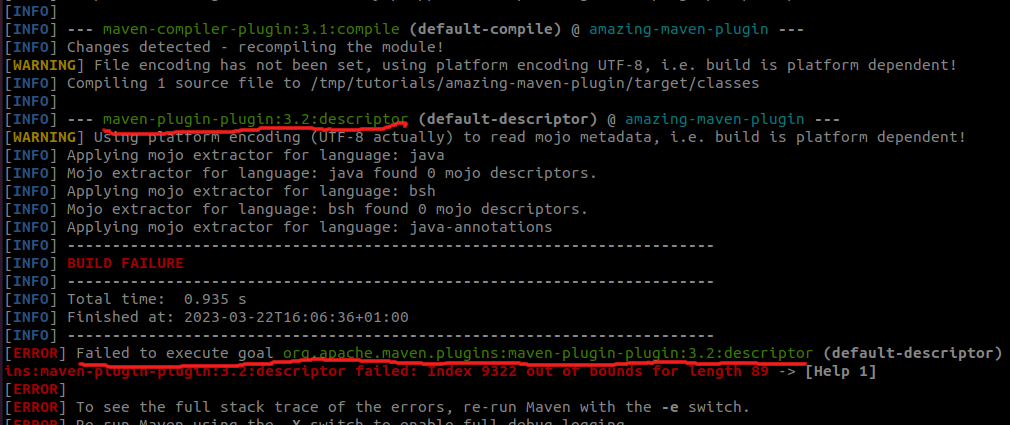
We see that it is executing version 3.2 of maven-plugin-plugin in some phase after compile.
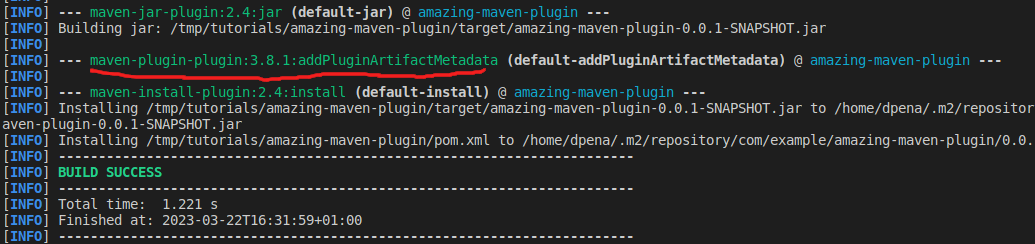
As we have changed the processing of the metainformation (goal, phase, etc..) and we are making use of annotations we are going to specifically indicate in the project that we want to make use of a more current version of maven-plugin-plugin (3.8.1) which does support annotations.
We add to pom.xml
    <build>
        <plugins>
            <plugin>
                <groupId>org.apache.maven.plugins</groupId>
                <artifactId>maven-plugin-plugin</artifactId>
                <version>3.8.1</version>
                <executions>
                    <execution>
                        <id>mojo-descriptor</id>
                        <goals>
                            <goal>descriptor</goal>
                        </goals>
                    </execution>
                </executions>
            </plugin>
        </plugins>
    </build>
Now we can compile and package correctly:
8. PACKAGING WHAT HAVE WE OBTAINED?
From the processing of maven-plugin-plugin we obtain a plugin in JAR format that contains the compiled code to execute and the metainformation that describes the plugin.
Let’s analyze the result.
Exploring the jar generated in /target/amazing-maven-plugin-0.0.1-SNAPSHOT.jar we find the .class files, but we also find a file with metainformation in /META-INF/maven/plugin.xml:
<?xml version="1.0"?>
<!--  Generated by maven-plugin-tools 3.8 -->
<plugin>
  <name>amazing-maven-plugin Maven Mojo</name>
  <description/>
  <groupId>com.example</groupId>
  <artifactId>amazing-maven-plugin</artifactId>
  <version>0.0.1-SNAPSHOT</version>
  <goalPrefix>amazing</goalPrefix>
  <isolatedRealm>false</isolatedRealm>
  <inheritedByDefault>true</inheritedByDefault>
  <requiredJavaVersion>17</requiredJavaVersion>
  <requiredMavenVersion>2.0</requiredMavenVersion>
  <mojos>
    <mojo>
      <goal>touch</goal>
      <description>Goal which touches a timestamp file.</description>
      <requiresDirectInvocation>false</requiresDirectInvocation>
      <requiresProject>true</requiresProject>
      <requiresReports>false</requiresReports>
      <aggregator>false</aggregator>
      <requiresOnline>false</requiresOnline>
      <inheritedByDefault>true</inheritedByDefault>
      <phase>process-classes</phase>
      <implementation>com.example.MyMojo</implementation>
      <language>java</language>
      <instantiationStrategy>per-lookup</instantiationStrategy>
      <executionStrategy>once-per-session</executionStrategy>
      <threadSafe>false</threadSafe>
      <parameters/>
    </mojo>
  </mojos>
  <dependencies>
    <dependency>
      <groupId>org.apache.maven</groupId>
      <artifactId>maven-plugin-api</artifactId>
      <type>jar</type>
      <version>2.0</version>
    </dependency>
  </dependencies>
</plugin>
- goalPrefix: in goal resolution Maven uses a nomenclature. We will see this property later
- requiredJavaVersion: Minimum required java version (since it was compiled with java 17)
- requiredMavenVersion: Minimum maven version to execute the plugin
And we see that it has analyzed our class annotated with @Mojo and has created a section for this metainformation file:
4.
9. EXECUTING A PLUGIN
We have 2 ways to execute a goal of a Maven plugin.
-
Transitive invocation: Our plugin is defined within a project (POM) and when its phase arrives it executes. It is the most common mode you will have used.
-
Direct invocation: That is, we don’t execute the plugin within the lifecycle, but we execute it manually. A clear example is mvn archetype:create (we are executing the create goal of the maven-archetype-plugin).
For direct invocation we need to indicate the coordinates of the maven artifact and the goal to execute.
We go to an empty directory and execute in this case:
# Create empty dir
$ mkdir tmp
$ cd tmp
$ mvn com.example:amazing-maven-plugin:0.0.1-SNAPSHOT:touch

[INFO] Scanning for projects...
[INFO]
[INFO] ------------------< com.example:amazing-maven-plugin >------------------
[INFO] Building amazing-maven-plugin Maven Mojo 0.0.1-SNAPSHOT
[INFO] ----------------------------[ maven-plugin ]----------------------------
[INFO]
[INFO] --- amazing-maven-plugin:0.0.1-SNAPSHOT:touch (default-cli) @ amazing-maven-plugin ---
[INFO]  ----- I AM THE TOUCH EXECUTION -----
[INFO] ------------------------------------------------------------------------
[INFO] BUILD SUCCESS
[INFO] ------------------------------------------------------------------------
[INFO] Total time:  0.086 s
[INFO] Finished at: 2023-03-23T08:17:02+01:00
[INFO] ------------------------------------------------------------------------
9.1 REQUIRES PROJECT
This property of the @Mojo annotation indicates if the plugin needs to be executed in a context where a Maven project (POM) exists. For example maven-compiler-plugin is a clear example. It needs some pre-existing .java files to be able to do its job.
Let’s change the property of the annotation:
@Mojo(name = "touch", requiresProject = true, defaultPhase = LifecyclePhase.PROCESS_CLASSES)
public class MyMojo extends AbstractMojo {
We analyze the descriptor META-INF/maven/plugin.xml and we see that the descriptor has changed:
We execute the plugin goal again in direct mode:
$ mvn com.example:amazing-maven-plugin:0.0.1-SNAPSHOT:touch
[INFO] Scanning for projects...
[INFO]
[INFO] ------------------< org.apache.maven:standalone-pom >-------------------
[INFO] Building Maven Stub Project (No POM) 1
[INFO] --------------------------------[ pom ]---------------------------------
[INFO] ------------------------------------------------------------------------
[INFO] BUILD FAILURE
[INFO] ------------------------------------------------------------------------
[INFO] Total time:  0.053 s
[INFO] Finished at: 2023-03-23T08:27:19+01:00
[INFO] ------------------------------------------------------------------------
[ERROR] Failed to execute goal com.example:amazing-maven-plugin:0.0.1-SNAPSHOT:touch (default-cli): Goal requires a project to execute but there is no POM in this directory (/home/tutorials/tmp). Please verify you invoked Maven from the correct directory. -> [Help 1]
[ERROR]
[ERROR] To see the full stack trace of the errors, re-run Maven with the -e switch.
[ERROR] Re-run Maven using the -X switch to enable full debug logging.
[ERROR]
[ERROR] For more information about the errors and possible solutions, please read the following articles:
[ERROR] [Help 1] http://cwiki.apache.org/confluence/display/MAVEN/MissingProjectException
We need an existing Maven project that serves as a host for execution. We create a project using one of the archetypes that maven offers
$ mvn archetype:generate -B \
-DgroupId=com.examples \
-DartifactId=project \
-Dversion=1.0-SNAPSHOT \
-DarchetypeGroupId=org.apache.maven.archetypes \
-DarchetypeArtifactId=maven-archetype-quickstart \
-DarchetypeVersion=1.4

...
...

[INFO] Project created from Archetype in dir: /home/tutorials/tmp/project
[INFO] ------------------------------------------------------------------------
[INFO] BUILD SUCCESS
[INFO] ------------------------------------------------------------------------
[INFO] Total time:  9.279 s
[INFO] Finished at: 2023-03-23T08:52:50+01:00
[INFO] ------------------------------------------------------------------------
$ cd /home/tutorials/tmp
$ mvn com.example:amazing-maven-plugin:0.0.1-SNAPSHOT:touch
[INFO] Scanning for projects...
[INFO]
[INFO] ------------------------< com.examples:project >------------------------
[INFO] Building project 1.0-SNAPSHOT
[INFO] --------------------------------[ jar ]---------------------------------
[INFO]
[INFO] --- amazing-maven-plugin:0.0.1-SNAPSHOT:touch (default-cli) @ project ---
[INFO]  ----- I AM THE TOUCH EXECUTION -----
[INFO] ------------------------------------------------------------------------
[INFO] BUILD SUCCESS
[INFO] ------------------------------------------------------------------------
[INFO] Total time:  0.086 s
[INFO] Finished at: 2023-03-23T08:55:42+01:00
[INFO] ------------------------------------------------------------------------
9.3 TRANSITIVE EXECUTION
Direct execution makes sense in certain occasions, but generally we want to integrate plugins automatically in the lifecycle of a project, either by indicating it in the project itself or in a hierarchy of projects (using
To include a plugin in the maven POM project description file, it is enough to include the plugin in its
We open the POM file of the project we just created and include in the build section the plugin to use and the goal:
    ...
    ...
    </pluginManagement>
    <plugins>
        <plugin>
            <groupId>com.example</groupId>
            <artifactId>amazing-maven-plugin</artifactId>
            <version>0.0.1-SNAPSHOT</version>
            <executions>
                <execution>
                    <goals>
                        <goal>touch</goal>
                    </goals>
                </execution>
            </executions>
        </plugin>
    </plugins>
</build>
Now when we execute the maven build cycle, maven will read the descriptors and will execute that plugin in the phase in which it was defined (if you remember we have defined it in the phase LifecyclePhase.PROCESS_CLASSES)
$ mvn clean install
[INFO] Scanning for projects...
[INFO]
[INFO] ------------------------< com.examples:project >------------------------
[INFO] Building project 1.0-SNAPSHOT
[INFO] --------------------------------[ jar ]---------------------------------
[INFO]
[INFO] --- maven-clean-plugin:3.1.0:clean (default-clean) @ project ---
[INFO] Deleting /home/tmp/project/target
[INFO]
[INFO] --- maven-resources-plugin:3.0.2:resources (default-resources) @ project ---
[INFO] Using 'UTF-8' encoding to copy filtered resources.
[INFO] skip non existing resourceDirectory /home/tmp/project/src/main/resources
[INFO]
[INFO] --- maven-compiler-plugin:3.8.0:compile (default-compile) @ project ---
[INFO] Changes detected - recompiling the module!
[INFO] Compiling 1 source file to /home/tmp/project/target/classes
[INFO]
[INFO] --- amazing-maven-plugin:0.0.1-SNAPSHOT:touch (default) @ project ---
[INFO]  ----- I AM THE TOUCH EXECUTION -----
[INFO]
[INFO] --- maven-resources-plugin:3.0.2:testResources (default-testResources) @ project ---
[INFO] Using 'UTF-8' encoding to copy filtered resources.
...
...

10. PARAMETERIZATION OF A MAVEN PLUGIN
Generally in the execution of our plugin we need information about the project where it is being executed (POM) or the execution context (directory), or any other type of extra information (maybe a url where to connect to perform some type of task, etc..).
To inject a parameter into our plugin, it is enough to create a variable in our Mojo and use the @Parameter annotation.
We change the code for something similar to this:
@Mojo(name = "touch", requiresProject = true, defaultPhase = LifecyclePhase.PROCESS_CLASSES)
public class MyMojo extends AbstractMojo{

    @Parameter(property = "parameterA"  , defaultValue = "", required = true, readonly = true)
    String parameterA;


    public void execute() throws MojoExecutionException
    {
        this.getLog().info(" ----- I AM THE TOUCH EXECUTION -----");
        this.getLog().info(String.format(" ----- parameterA = %s -----",parameterA));
    }
}
10.1 Direct execution injecting the parameter
For direct execution, we inject the parameter with -D
$ mvn com.example:amazing-maven-plugin:0.0.1-SNAPSHOT:touch -DparameterA=Peace

[INFO] Scanning for projects...
[INFO]
[INFO] ------------------------< com.examples:project >------------------------
[INFO] Building project 1.0-SNAPSHOT
[INFO] --------------------------------[ jar ]---------------------------------
[INFO]
[INFO] --- amazing-maven-plugin:0.0.1-SNAPSHOT:touch (default-cli) @ project ---
[INFO]  ----- I AM THE TOUCH EXECUTION -----
[INFO]  ----- parameterA = Peace -----
[INFO] ------------------------------------------------------------------------
[INFO] BUILD SUCCESS
[INFO] ------------------------------------------------------------------------
[INFO] Total time:  0.103 s
[INFO] Finished at: 2023-03-23T14:04:01+01:00
[INFO] ------------------------------------------------------------------------
Transitive execution, we parameterize the plugin with that parameter in the
    <plugin>
        <groupId>com.example</groupId>
        <artifactId>amazing-maven-plugin</artifactId>
        <version>0.0.1-SNAPSHOT</version>
        <configuration>
            <parameterA>StopWarUkraine</parameterA>
        </configuration>
        <executions>
            <execution>
                <goals>
                    <goal>touch</goal>
                </goals>
            </execution>
        </executions>
    </plugin>
and we execute the project lifecycle
$ mvn clean install
[INFO] Scanning for projects...
[INFO]
[INFO] ------------------------< com.examples:project >------------------------
[INFO] Building project 1.0-SNAPSHOT
[INFO] --------------------------------[ jar ]---------------------------------
[INFO]
[INFO] --- maven-clean-plugin:3.1.0:clean (default-clean) @ project ---
[INFO] Deleting /home/dpena/development/workspaces/daniel/github/deadveloper/tmp/project/target
[INFO]
[INFO] --- maven-resources-plugin:3.0.2:resources (default-resources) @ project ---
[INFO] Using 'UTF-8' encoding to copy filtered resources.
[INFO] skip non existing resourceDirectory /home/dpena/development/workspaces/daniel/github/deadveloper/tmp/project/src/main/resources
[INFO]
[INFO] --- maven-compiler-plugin:3.8.0:compile (default-compile) @ project ---
[INFO] Changes detected - recompiling the module!
[INFO] Compiling 1 source file to /home/dpena/development/workspaces/daniel/github/deadveloper/tmp/project/target/classes
[INFO]
[INFO] --- amazing-maven-plugin:0.0.1-SNAPSHOT:touch (default) @ project ---
[INFO]  ----- I AM THE TOUCH EXECUTION -----
[INFO]  ----- parameterA = StopWarUkraine -----
[INFO]
[INFO] --- maven-resources-plugin:3.0.2:testResources (default-testResources) @ project ---
[INFO] Using 'UTF-8' encoding to copy filtered resources.
[INFO] skip non existing resourceDirectory /home/dpena/development/workspaces/daniel/github/deadveloper/tmp/project/src/test/resources
If we review the metadata generated by maven-plugin-plugin we can see that the parameters are reflected

10.2 CONTEXTUAL PARAMETERS
When mvn is executed it collects contextual information relative to the process (for example it reads the settings.xml, reads the POM, looks at the MOJO it has available for its execution, etc…).
Many of these parameters are available at runtime and we can inject them into our plugin.
Let’s inject a reference to the Maven Project in which our plugin is being executed.
For this we need to edit our plugin:
- Inject the lib that gives us access to the POM reading api in our dependencies:
- In our mojo we inject a variable of type MavenProject and change the execute to see how we can explore this object:
....

 import org.apache.maven.project.MavenProject;
.....
@Mojo(name = "touch", requiresProject = true, defaultPhase = LifecyclePhase.PROCESS_CLASSES)
public class MyMojo extends AbstractMojo{

    @Parameter(property = "parameterA"  , defaultValue = "", required = true, readonly = true)
    String parameterA;

    @Parameter(defaultValue = "${project}", required = true, readonly = true)
    MavenProject project;


    public void execute() throws MojoExecutionException
    {
        this.getLog().info(String.format(" ----- I AM THE TOUCH EXECUTION on %s %s -----", project.getArtifactId(), project.getVersion()));
        for(Dependency dep: project.getDependencies()) {
            this.getLog().info(String.format("Detected Dep: %s %s" , dep.getArtifactId(), dep.getVersion()));
        }

        this.getLog().info(String.format(" ----- parameterA = %s -----",parameterA));
    }
}
$ mvn clean install

[INFO] Scanning for projects...
[INFO]
[INFO] ------------------------< com.examples:project >------------------------
[INFO] Building project 1.0-SNAPSHOT
[INFO] --------------------------------[ jar ]---------------------------------
[INFO]
[INFO] --- maven-clean-plugin:3.1.0:clean (default-clean) @ project ---
[INFO] Deleting /home/dpena/development/workspaces/daniel/github/deadveloper/tmp/project/target
[INFO]
[INFO] --- maven-resources-plugin:3.0.2:resources (default-resources) @ project ---
[INFO] Using 'UTF-8' encoding to copy filtered resources.
[INFO] skip non existing resourceDirectory /home/dpena/development/workspaces/daniel/github/deadveloper/tmp/project/src/main/resources
[INFO]
[INFO] --- maven-compiler-plugin:3.8.0:compile (default-compile) @ project ---
[INFO] Changes detected - recompiling the module!
[INFO] Compiling 1 source file to /home/dpena/development/workspaces/daniel/github/deadveloper/tmp/project/target/classes
[INFO]
[INFO] --- amazing-maven-plugin:0.0.1-SNAPSHOT:touch (default) @ project ---
[INFO]  ----- I AM THE TOUCH EXECUTION on project 1.0-SNAPSHOT -----
[INFO] Detected Dep: junit 4.11
[INFO]  ----- parameterA = StopWarUkraine -----
[INFO]
Ideas: At this point we could make a plugin that looks at the dependencies and if there is any that we do not allow, throw a MojoExecutionException.
11. DEBUGGING A MAVEN PLUGIN
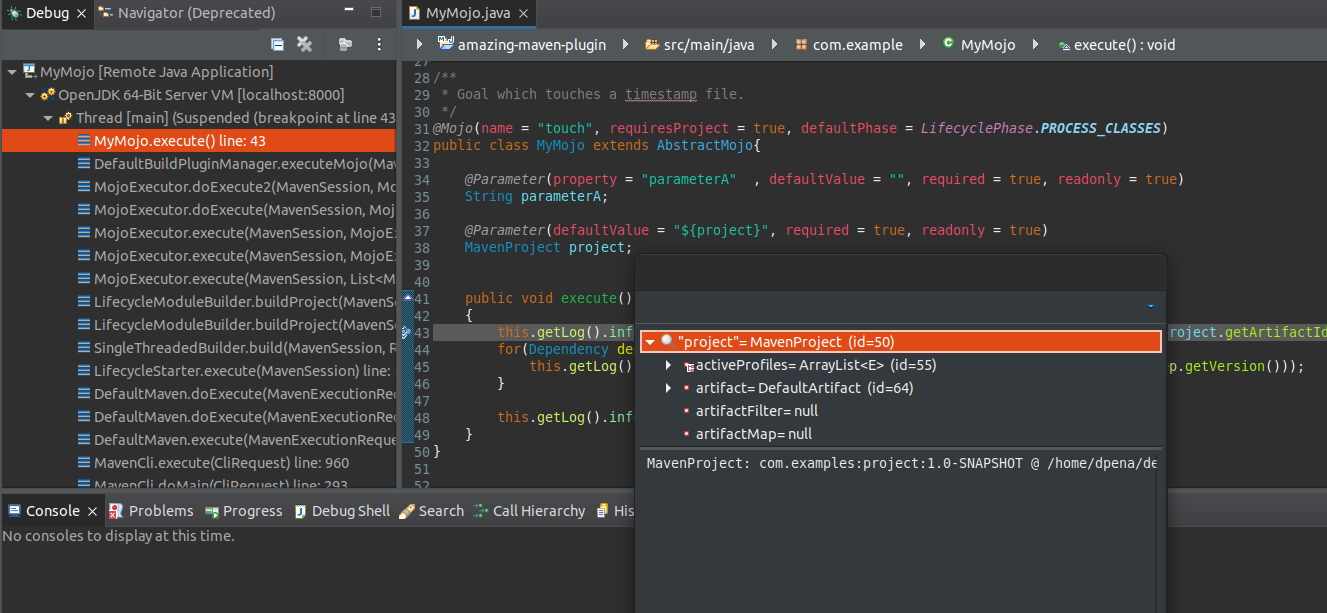
If our plugin has a complex execution or if we want to see it working internally in a context we can use the mvnDebug executable, which internally adds remote Debug parameters when executed in the virtual machine.
mvnDebug will wait for the connection on port 8000
$ /home/.../project/$ mvnDebug clean install
Preparing to execute Maven in debug mode
Listening for transport dt_socket at address: 8000
12. NOMENCLATURE AND ALIAS
Every time we execute a goal of a plugin in direct execution mode, we must indicate the complete coordinates:
Maybe this line is very “ugly” and we would like to do something like mvn archetype:generate
To make use of our own plugins (remember format ${name}-maven-plugin), we must specify the groupId of the plugins that are not from the maven core that we want to use.
</settings>
    ...
    <pluginGroups>
    <!-- pluginGroup
     | Specifies a further group identifier to use for plugin lookup.
    <pluginGroup>com.your.plugins</pluginGroup>
    -->
        <pluginGroup>com.example</pluginGroup>
  </pluginGroups>
...

</settings>
As we have followed the established nomenclature ${pluginName}-maven-plugin, we can see that the descriptor of our plugin calculated property
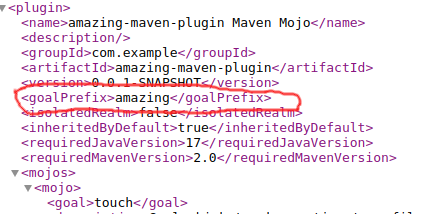
Now we can execute directly indicating the goalPrefix and the goal to execute:
$ mvn amazing:touch -DparameterA=Peace

[INFO] Scanning for projects...
[INFO]
[INFO] ------------------------< com.examples:project >------------------------
[INFO] Building project 1.0-SNAPSHOT
[INFO] --------------------------------[ jar ]---------------------------------
[INFO]
[INFO] --- amazing-maven-plugin:0.0.1-SNAPSHOT:touch (default-cli) @ project ---
[INFO]  ----- I AM THE TOUCH EXECUTION on project 1.0-SNAPSHOT -----
[INFO] Detected Dep: junit 4.11
[INFO]  ----- parameterA = StopWarUkraine -----
[INFO] ------------------------------------------------------------------------
[INFO] BUILD SUCCESS
[INFO] ------------------------------------------------------------------------
13. INSTALLING THE PLUGIN REMOTELY (REMOTE RESOLUTION)
The ideal of the plugin is to distribute it so that it can be used by a team. So we are going to deploy the plugin and then try to invoke it.
Starting nexus in local docker
We start the docker image to do the tests:
$ docker run --rm -p 8081:8081 --name nexusLocal sonatype/nexus3
...
...
...............AdminPasswordFileManagerImpl - Writing admin user temporary password to /nexus-data/admin.password
............. AbstractConnector - Started ServerConnector@61df8c80{HTTP/1.1, (http/1.1)}{0.0.0.0:8081}
-------------------------------------------------

Started Sonatype Nexus OSS 3.49.0-02

-------------------------------------------------
As we can see, the docker image generates the admin password in the file /nexus-data/admin.password We extract it by executing
We visit http://localhost:8081 and login (button on the upper right), with the credentials admin / d628b7d5-81eb-4470-af9d-7eefacd00a87.

We change the password to “admin123”.
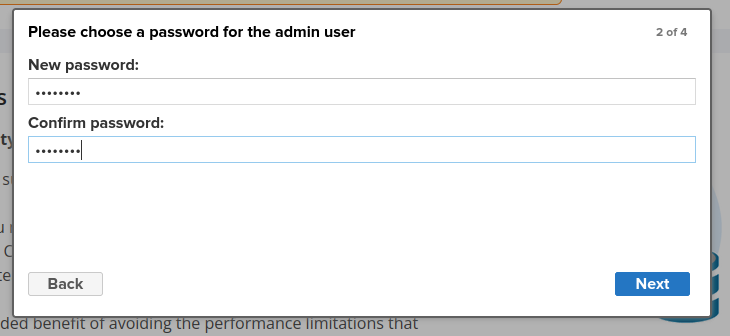
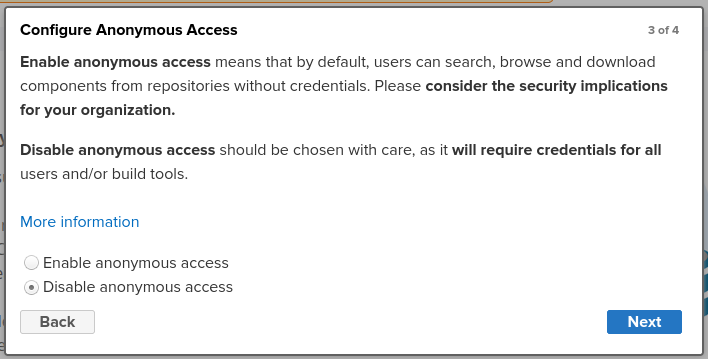
And we disable anonymous access:
Settings.xml configuration
To make use of the nexus repository locally, we change our settings.xml with this configuration:
<?xml version="1.0" encoding="UTF-8"?>
<settings xmlns="http://maven.apache.org/SETTINGS/1.1.0"
  xmlns:xsi="http://www.w3.org/2001/XMLSchema-instance"
  xsi:schemaLocation="http://maven.apache.org/SETTINGS/1.1.0 http://maven.apache.org/xsd/settings-1.1.0.xsd">

  <servers>
    <server>
      <id>nexus-snapshots</id>
      <username>admin</username>
      <password>admin123</password>
    </server>
    <server>
      <id>nexus-releases</id>
      <username>admin</username>
      <password>admin123</password>
    </server>
  </servers>

  <profiles>
    <profile>
      <repositories>
        <repository>
          <snapshots>
            <enabled>true</enabled>
          </snapshots>
          <id>nexus-releases</id>
          <name>nexus-releases</name>
          <url>http://localhost:8081/repository/maven-releases/</url>
        </repository>
        <repository>
          <snapshots />
          <id>nexus-snapshots</id>
          <name>nexus-snapshots</name>
          <url>http://localhost:8081/repository/maven-snapshots/</url>
        </repository>
      </repositories>
      <pluginRepositories>
        <pluginRepository>
          <snapshots>
            <enabled>true</enabled>
          </snapshots>
          <id>nexus-releases</id>
          <name>nexus-releases</name>
          <url>http://localhost:8081/repository/maven-releases/</url>
        </pluginRepository>
        <pluginRepository>
          <snapshots>
            <enabled>true</enabled>
          </snapshots>
          <id>nexus-snapshots</id>
          <name>nexus-snapshots</name>
          <url>http://localhost:8081/repository/maven-snapshots/</url>
        </pluginRepository>
      </pluginRepositories>
      <properties>
        <downloadSources>true</downloadSources>
        <downloadJavadocs>true</downloadJavadocs>
      </properties>
      <id>localNexus</id>
    </profile>
  </profiles>
  <activeProfiles>
    <activeProfile>localNexus</activeProfile>
  </activeProfiles>
  <pluginGroups>
        <pluginGroup>com.example</pluginGroup>
  </pluginGroups>
</settings>
14. DEPLOYING THE AMAZING MAVEN PLUGIN
We edit the pom.xml and add the
    <distributionManagement>
        <repository>
            <id>nexus-releases</id>
            <url>http://localhost:8081/repository/maven-releases/</url>
        </repository>
        <snapshotRepository>
            <id>nexus-snapshots</id>
            <url>http://localhost:8081/repository/maven-snapshots/</url>
        </snapshotRepository>
    </distributionManagement>
and we add the nexus-staging-maven-plugin to be able to do the deploy.
    ....
        <plugin>
            <groupId>org.sonatype.plugins</groupId>
            <artifactId>nexus-staging-maven-plugin</artifactId>
            <version>1.5.1</version>
            <executions>
                <execution>
                    <id>default-deploy</id>
                    <phase>deploy</phase>
                    <goals>
                        <goal>deploy</goal>
                    </goals>
                </execution>
            </executions>
            <configuration>
                <serverId>nexus</serverId>
                <nexusUrl>http://localhost:8081/nexus/</nexusUrl>
                <skipStaging>true</skipStaging>
            </configuration>
        </plugin>
    ....
Generally maven-deploy-plugin is used to perform deploy tasks to repositories based on Nexus (for example artifactory Jfrog). But Sonatype created the nexus-staging-maven-plugin which is more complete and specific for Sonatype (Nexus) repositories.
We execute the deploy phase in the amazing-maven-plugin project
mvn clean deploy -Dmaven.test.skip=true
...
...
Uploading to nexus-snapshots: http://localhost:8081/repository/maven-snapshots/com/example/amazing-maven-plugin/0.0.1-SNAPSHOT/maven-metadata.xml
Uploaded to nexus-snapshots: http://localhost:8081/repository/maven-snapshots/com/example/amazing-maven-plugin/0.0.1-SNAPSHOT/maven-metadata.xml (781 B at 11 kB/s)
Uploading to nexus-snapshots: http://localhost:8081/repository/maven-snapshots/com/example/amazing-maven-plugin/maven-metadata.xml
Uploaded to nexus-snapshots: http://localhost:8081/repository/maven-snapshots/com/example/amazing-maven-plugin/maven-metadata.xml (327 B at 9.9 kB/s)
Uploading to nexus-snapshots: http://localhost:8081/repository/maven-snapshots/com/example/maven-metadata.xml
Uploaded to nexus-snapshots: http://localhost:8081/repository/maven-snapshots/com/example/maven-metadata.xml (248 B at 7.3 kB/s)
[INFO]  * Bulk deploy of locally gathered snapshot artifacts finished.
[INFO] Remote deploy finished with success.
[INFO] ------------------------------------------------------------------------
[INFO] BUILD SUCCESS
[INFO] ------------------------------------------------------------------------
[INFO] Total time:  2.731 s
[INFO] Finished at: 2023-03-23T17:54:50+01:00
[INFO] ------------------------------------------------------------------------
For the purpose of this demo you must delete ./m2/repository/com/example after doing the deploy, to make sure that the next time we want to use it it is downloaded from the remote repository.
15. IMPORTING PLUGIN DEPENDENCIES
As we have seen, we have configured our settings.xml indicating the pluginRepositories section to be able to use plugins from our repository. We have left the <pluginRepositories>
<pluginRepository>
<snapshots>
<enabled>true</enabled>
</snapshots>
<id>nexus-releases</id>
<name>nexus-releases</name>
<url>http://localhost:8081/repository/maven-releases/</url>
</pluginRepository>
<pluginRepository>
<snapshots>
<enabled>true</enabled>
</snapshots>
<id>nexus-snapshots</id>
<name>nexus-snapshots</name>
<url>http://localhost:8081/repository/maven-snapshots/</url>
</pluginRepository>
</pluginRepositories>
....
<pluginGroups>
<pluginGroup>com.example</pluginGroup>
</pluginGroups>
...
If we go to the project and do a direct execution
$ mvn amazing:touch -DparameterA=Testing
[INFO] Scanning for projects...
Downloading from central: https://repo.maven.apache.org/maven2/com/example/maven-metadata.xml
Downloading from nexus-releases: http://localhost:8081/repository/maven-releases/com/example/maven-metadata.xml
Downloading from nexus-snapshots: http://localhost:8081/repository/maven-snapshots/com/example/maven-metadata.xml
Downloaded from nexus-snapshots: http://localhost:8081/repository/maven-snapshots/com/example/maven-metadata.xml (248 B at 3.6 kB/s)
....
...
Downloaded from nexus-snapshots: http://localhost:8081/repository/maven-snapshots/com/example/amazing-maven-plugin/0.0.1-SNAPSHOT/amazing-maven-plugin-0.0.1-20230323.165447-1.jar (4.9 kB at 182 kB/s)
[INFO]
[INFO] ------------------------< com.examples:project >------------------------
[INFO] Building project 1.0-SNAPSHOT
[INFO] --------------------------------[ jar ]---------------------------------
[INFO]
[INFO] --- amazing-maven-plugin:0.0.1-SNAPSHOT:touch (default-cli) @ project ---
[INFO]  ----- I AM THE TOUCH EXECUTION on project 1.0-SNAPSHOT -----
[INFO] Detected Dep: junit 4.11
[INFO]  ----- parameterA = Testing -----
[INFO] ------------------------------------------------------------------------
[INFO] BUILD SUCCESS
[INFO] ------------------------------------------------------------------------
[INFO] Total time:  0.666 s
[INFO] Finished at: 2023-03-23T18:00:53+01:00
[INFO] ------------------------------------------------------------------------
We can observe how Maven works, it explores the maven-metadata files of maven central and of the groupIds indicated in
If we remove the
We repeat the process looking for direct execution through the alias (don’t forget to delete ./m2/repository/com/example which we downloaded in the previous execution):
$ mvn amazing:touch -DparameterA=Testing
[INFO] Scanning for projects...
Downloading from nexus-releases: http://localhost:8081/repository/maven-releases/org/codehaus/mojo/maven-metadata.xml
Downloading from central: https://repo.maven.apache.org/maven2/org/apache/maven/plugins/maven-metadata.xml
Downloading from nexus-releases: http://localhost:8081/repository/maven-releases/org/apache/maven/plugins/maven-metadata.xml
Downloading from nexus-snapshots: http://localhost:8081/repository/maven-snapshots/org/apache/maven/plugins/maven-metadata.xml
Downloading from nexus-snapshots: http://localhost:8081/repository/maven-snapshots/org/codehaus/mojo/maven-metadata.xml
Downloading from central: https://repo.maven.apache.org/maven2/org/codehaus/mojo/maven-metadata.xml
Downloaded from central: https://repo.maven.apache.org/maven2/org/apache/maven/plugins/maven-metadata.xml (14 kB at 88 kB/s)
Downloaded from central: https://repo.maven.apache.org/maven2/org/codehaus/mojo/maven-metadata.xml (21 kB at 189 kB/s)
[INFO] ------------------------------------------------------------------------
[INFO] BUILD FAILURE
[INFO] ------------------------------------------------------------------------
[INFO] Total time:  0.414 s
[INFO] Finished at: 2023-03-23T18:42:35+01:00
[INFO] ------------------------------------------------------------------------
[ERROR] No plugin found for prefix 'amazing' in the current project and in the plugin groups [org.apache.maven.plugins, org.codehaus.mojo] available from the repositories [local (/home/dpena/.m2/repository), nexus-releases (http://localhost:8081/repository/maven-releases/), nexus-snapshots (http://localhost:8081/repository/maven-snapshots/), central (https://repo.maven.apache.org/maven2)] -> [Help 1]
[ERROR]
[ERROR] To see the full stack trace of the errors, re-run Maven with the -e switch.
[ERROR] Re-run Maven using the -X switch to enable full debug logging.
[ERROR]
[ERROR] For more information about the errors and possible solutions, please read the following articles:
[ERROR] [Help 1] http://cwiki.apache.org/confluence/display/MAVEN/NoPluginFoundForPrefixException
15.1 Direct execution but indicating complete coordinates
If on the contrary we specify the complete coordinates of the plugin it will find it
$ mvn com.example:amazing-maven-plugin:0.0.1-SNAPSHOT:touch -DparameterA=hello
[INFO] Scanning for projects...
Downloading from nexus-snapshots: http://localhost:8081/repository/maven-snapshots/com/example/amazing-maven-plugin/0.0.1-SNAPSHOT/maven-metadata.xml
Downloading from nexus-releases: http://localhost:8081/repository/maven-releases/com/example/amazing-maven-plugin/0.0.1-SNAPSHOT/maven-metadata.xml
Downloaded from nexus-snapshots: http://localhost:8081/repository/maven-snapshots/com/example/amazing-maven-plugin/0.0.1-SNAPSHOT/maven-metadata.xml (781 B at 12 kB/s)
Downloading from nexus-releases: http://localhost:8081/repository/maven-releases/com/example/amazing-maven-plugin/0.0.1-SNAPSHOT/amazing-maven-plugin-0.0.1-20230323.165447-1.pom
Downloading from nexus-snapshots: http://localhost:8081/repository/maven-snapshots/com/example/amazing-maven-plugin/0.0.1-SNAPSHOT/amazing-maven-plugin-0.0.1-20230323.165447-1.pom
Downloaded from nexus-snapshots: http://localhost:8081/repository/maven-snapshots/com/example/amazing-maven-plugin/0.0.1-SNAPSHOT/amazing-maven-plugin-0.0.1-20230323.165447-1.pom (2.7 kB at 192 kB/s)
Downloading from nexus-snapshots: http://localhost:8081/repository/maven-snapshots/com/example/amazing-maven-plugin/0.0.1-SNAPSHOT/amazing-maven-plugin-0.0.1-20230323.165447-1.jar
Downloaded from nexus-snapshots: http://localhost:8081/repository/maven-snapshots/com/example/amazing-maven-plugin/0.0.1-SNAPSHOT/amazing-maven-plugin-0.0.1-20230323.165447-1.jar (4.9 kB at 328 kB/s)
[INFO]
[INFO] ------------------------< com.examples:project >------------------------
[INFO] Building project 1.0-SNAPSHOT
[INFO] --------------------------------[ jar ]---------------------------------
[INFO]
[INFO] --- amazing-maven-plugin:0.0.1-SNAPSHOT:touch (default-cli) @ project ---
[INFO]  ----- I AM THE TOUCH EXECUTION on project 1.0-SNAPSHOT -----
[INFO] Detected Dep: junit 4.11
[INFO]  ----- parameterA = hello -----
[INFO] ------------------------------------------------------------------------
[INFO] BUILD SUCCESS
[INFO] ------------------------------------------------------------------------
[INFO] Total time:  0.304 s
[INFO] Finished at: 2023-03-23T18:48:00+01:00
[INFO] ------------------------------------------------------------------------
And we would also have a satisfactory result if we do the transitive execution, since the definition in the POM.xml has the complete coordinates.
        <plugin>
            <groupId>com.example</groupId>
            <artifactId>amazing-maven-plugin</artifactId>
            <version>0.0.1-SNAPSHOT</version>
            <configuration>
                <parameterA>StopWarUkraine</parameterA>
            </configuration>
            <executions>
                <execution>
                    <goals>
                        <goal>touch</goal>
                    </goals>
                </execution>
            </executions>
        </plugin>
    </plugins>
$ mvn clean install
[INFO] Scanning for projects...
[INFO]
[INFO] ------------------------< com.examples:project >------------------------
[INFO] Building project 1.0-SNAPSHOT
[INFO] --------------------------------[ jar ]---------------------------------
Downloading from nexus-snapshots: http://localhost:8081/repository/maven-snapshots/com/example/amazing-maven-plugin/0.0.1-SNAPSHOT/maven-metadata.xml
Downloading from nexus-releases: http://localhost:8081/repository/maven-releases/com/example/amazing-maven-plugin/0.0.1-SNAPSHOT/maven-metadata.xml
Downloaded from nexus-snapshots: http://localhost:8081/repository/maven-snapshots/com/example/amazing-maven-plugin/0.0.1-SNAPSHOT/maven-metadata.xml (781 B at 14 kB/s)

.....
...
[INFO] --- amazing-maven-plugin:0.0.1-SNAPSHOT:touch (default) @ project ---
[INFO]  ----- I AM THE TOUCH EXECUTION on project 1.0-SNAPSHOT -----
[INFO] Detected Dep: junit 4.11
[INFO]  ----- parameterA = StopWarUkraine -----

...
...

[INFO] BUILD SUCCESS
[INFO] ------------------------------------------------------------------------
[INFO] Total time:  1.520 s
[INFO] Finished at: 2023-03-23T18:52:33+01:00
16. CONCLUSION
SUMMARY: If you want to use the plugin in manual execution mode using the alias, you must define the
section in your settings.xml. In any other case, as we give the complete coordinates the plugin will be found and executed both in direct execution and in transitive execution