Publicando en Maven Central
1. Requirements
1.1 CREATE ACCOUNT IN SONATYPE
Enter the central Sonatype portal and click on SignIn (never login with Social Logins):

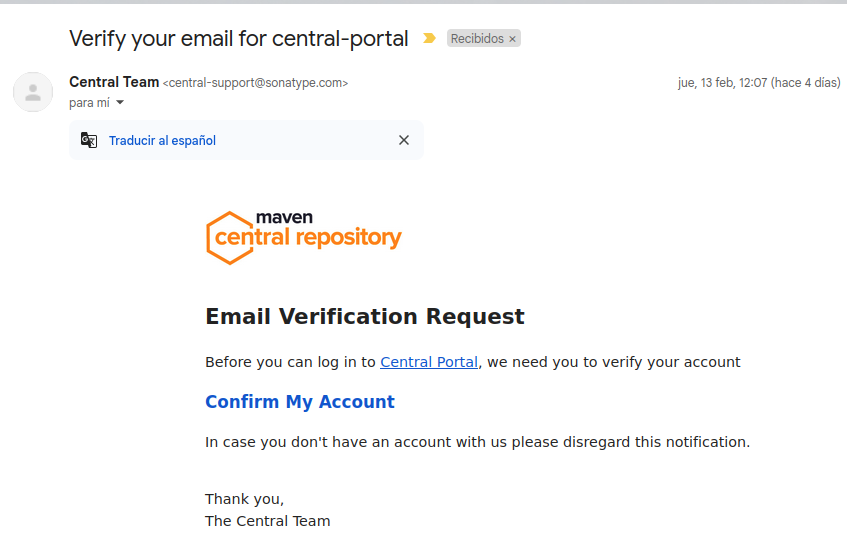
This will send us an email to validate the email. We click on the link
1.2 GENERATE CREDENTIALS
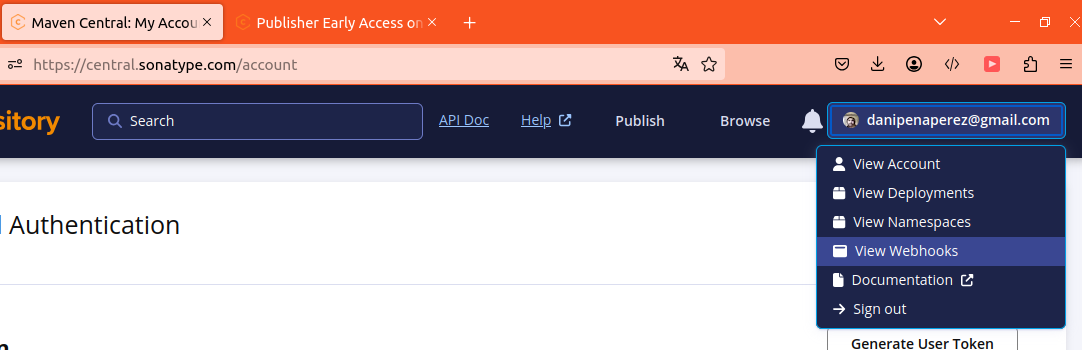
Under your user area, click on the “view account” option
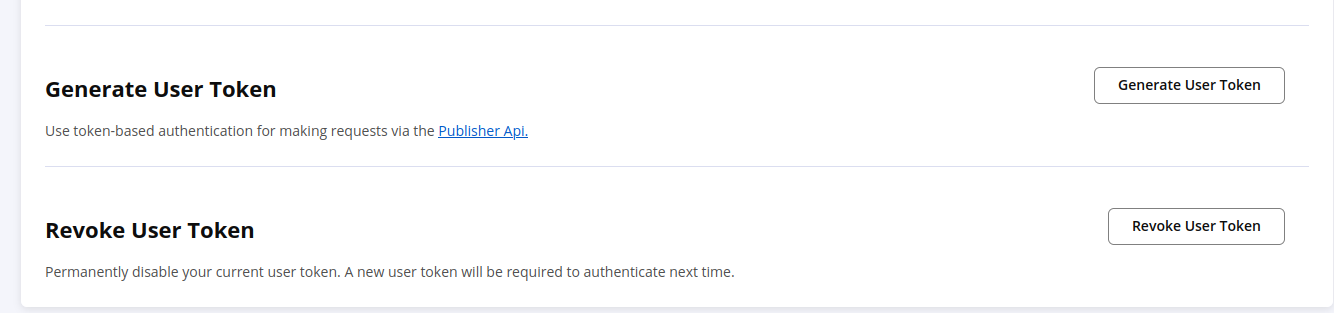
We click on Generate Token and save the value in a safe place
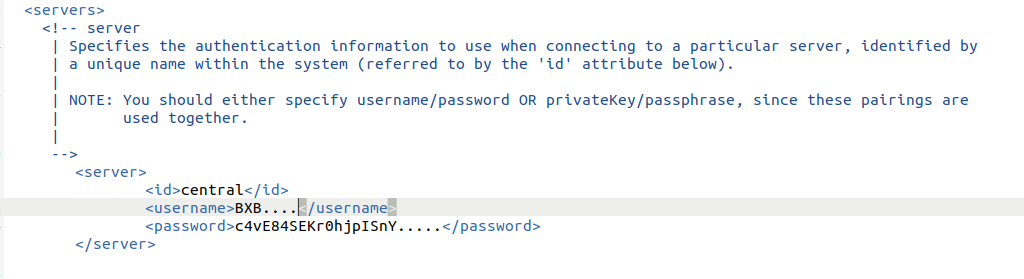
Copy the value of username and token
Expiration
Whenever you want you can regenerate and revoke the token.
With those credentials we configure the
Central vs osssrh
The OSSRH server has been the reference for a long time, it was the legacy service that replicated to maven Central. This tutorial talks about how to publish to Central directly.
1.3 CREATE A NAMESPACE
A namespace is what we commonly know as the groupId.
The groupId is unique and identifies the publisher.
It is very important, because we don’t want anyone to publish libraries that are not from our organization/company within our namespace (groupId), so we must register and have Maven Central verify its veracity.
Veracity of groupId/Namespace
Veracity is checked through the domain.
If we want to have, for example, the groupId: <groupId>com.mycompany</groupId>, we must be owners of the domain mycompany.com.
This validation will be done by requesting to add a TXT record in our DNS.
PUBLIC NAMESPACE GITHUB.com
Since the purpose of this tutorial is to publish a personal library that we have hosted on Github, we are not going to perform the namespace validation through DNS (since we are not owners of github.com) we are going to do it by adding the github namespace format:
io.github.{myuser}
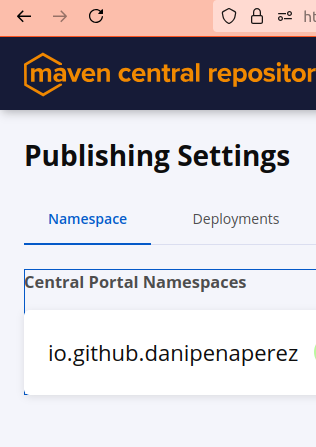
So we go to our account on the Sonatype website and in our user menu we click on Namespaces
Once created it is pending for validation:
Validating our repository in GITHUB
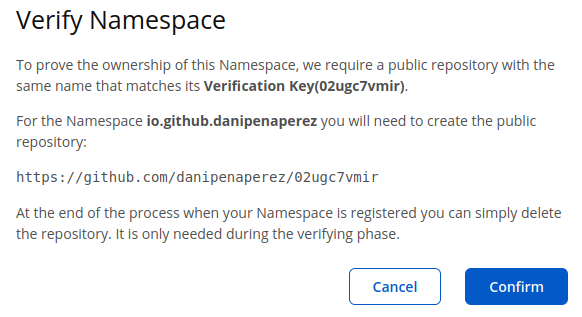
The website indicates the instructions to validate our user in Github, for this you must create an empty repository in your account with the name they tell you.
They show a screen like this indicating that name:
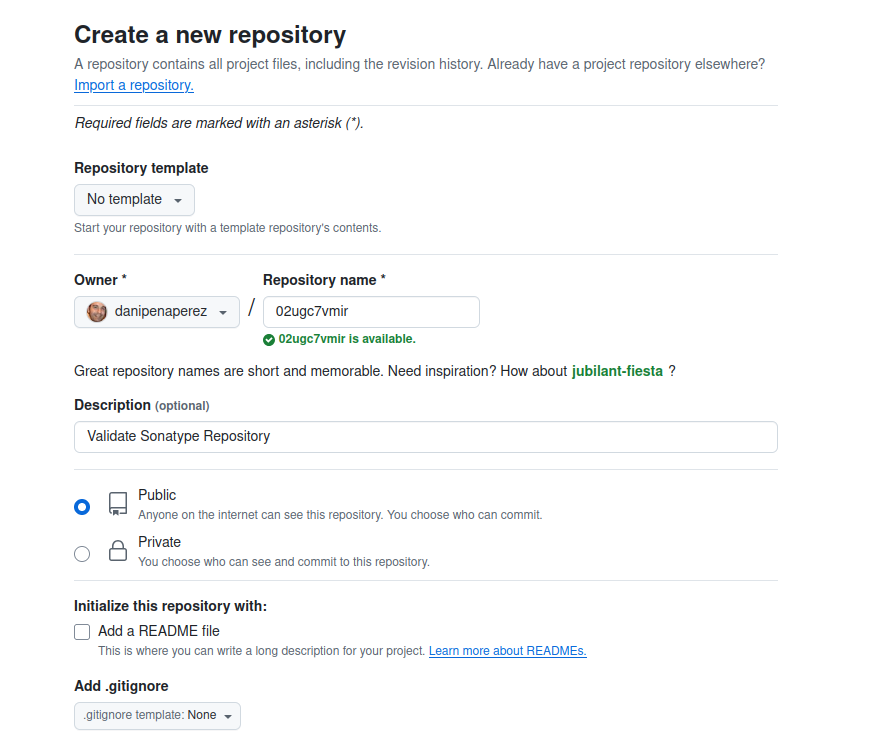
WE CREATE THE VALIDATION REPOSITORY IN OUR GITHUB ACCOUNT
We use the web wizard to create the repository. It doesn’t need to have content, just to exist:
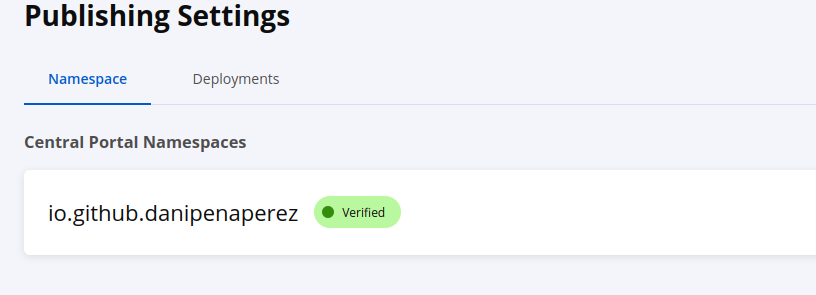
After a while, we see on the sonatype page that they have verified it
2. Preparing our Lib
Once we have the authorization from Maven Sonatype and the credentials to publish our artifacts, we are going to create and configure our Maven project to publish it.
2.1 GENERATING AN EMPTY MAVEN PROJECT
We generate a Maven project, in this case using one of the public archetypes:
mvn archetype:generate -DarchetypeGroupId=io.github.oliviercailloux -DarchetypeArtifactId=java-archetype
...

[INFO] Using property: version = 0.0.1-SNAPSHOT
Define value for property 'groupId': org.dppware
Define value for property 'artifactId': lib-utils-json
Define value for property 'package' org.dppware.lib-utils-json: org.dppware.lib.utils.json
Confirm properties configuration:
version: 0.0.1-SNAPSHOT
groupId: org.dppware
artifactId: lib-utils-json
package: org.dppware.lib.utils.json
2.2 MANDATORY SECTIONS IN POM.XML
We need to provide the meta-information that will be shown by Sonatype about your artifact in their directory.
To publish artifacts it is necessary that you provide at least this information:
- licenses
- developers
- SCM
- url
- description
Licenses:
I have used the generic APACHE one:
<licenses>
  <license>
    <name>The Apache License, Version 2.0</name>
    <url>http://www.apache.org/licenses/LICENSE-2.0.txt</url>
  </license>
</licenses>
At least one should exist:
 <developers>
    <developer>
      <name>Daniel Peña</name>
      <email>danipenaperez@gmail.com</email>
      <organization>DPPWare</organization>
      <organizationUrl>http://www.danipenaperez.com</organizationUrl>
    </developer>
  </developers>
Information specific to the SCM associated with your artifact:
<scm>
  <connection>scm:git:git://github.com/danipenaperez/lib-utils-json.git</connection>
  <developerConnection>scm:git:ssh://github.com:danipenaperez/lib-utils-json.git</developerConnection>
  <url>http://github.com/danipenaperez/lib-utils-json/tree/master</url>
</scm>
URL
Repository URL, in my case:
Description
Basic description of the artifact
2.3 SOURCES AND JAVADOC
As good practice, it is good to provide the sources and the javadoc so that Sonatype can store and serve them, so we add these plugins to the pom.xml:
<build>
  ...
  <plugin>
                <groupId>org.apache.maven.plugins</groupId>
                <artifactId>maven-source-plugin</artifactId>
                <version>2.2.1</version>
                <executions>
                    <execution>
                        <id>attach-sources</id>
                        <goals>
                            <goal>jar-no-fork</goal>
                        </goals>
                    </execution>
                </executions>
            </plugin>
            <plugin>
                <groupId>org.apache.maven.plugins</groupId>
                <artifactId>maven-javadoc-plugin</artifactId>
                <version>2.9.1</version>
                <executions>
                    <execution>
                        <id>attach-javadocs</id>
                        <goals>
                            <goal>jar</goal>
                        </goals>
                    </execution>
                </executions>
            </plugin>
      ....
<build>
2.4 SIGNING OUR ARTIFACTS
One of the fundamental requirements is that our artifacts are signed when publishing them, for this we are going to install the GPG utility on our pc
We will use this tool to generate keys for signing.
With those keys we can deploy from our machine or also upload them to github actions to use them to sign the artifacts.
Installation:
and we verify the installation$ gpg --version
gpg (GnuPG) 2.2.19
libgcrypt 1.8.5
Copyright (C) 2019 Free Software Foundation, Inc.
License GPLv3+: GNU GPL version 3 or later <https://gnu.org/licenses/gpl.html>
This is free software: you are free to change and redistribute it.
There is NO WARRANTY, to the extent permitted by law.
Home: /home/dpena/.gnupg
Available algorithms:
Public key: RSA, ELG, DSA, ECDH, ECDSA, EDDSA
Cipher: IDEA, 3DES, CAST5, BLOWFISH, AES, AES192, AES256, TWOFISH,
CAMELLIA128, CAMELLIA192, CAMELLIA256
Hash: SHA1, RIPEMD160, SHA256, SHA384, SHA512, SHA224
Compression: Uncompressed, ZIP, ZLIB, BZIP2
We are going to generate some keys (The key will also be secured on our pc to be able to recover it, since it has a validity of 2 years):
(You have more information https://central.sonatype.org/publish/requirements/gpg/#listing-keys
gpg --gen-key
gpg (GnuPG) 2.2.19; Copyright (C) 2019 Free Software Foundation, Inc.
This is free software: you are free to change and redistribute it.
There is NO WARRANTY, to the extent permitted by law.

Note: Use "gpg --full-generate-key" for a full featured key generation dialog.

GnuPG needs to construct a user ID to identify your key.

Real name: Daniel Peña Perez
Email address: danipenaperez@gmail.com
You are using the 'utf-8' character set.
You selected this USER-ID:
    "Daniel Peña Perez <danipenaperez@gmail.com>"

Change (N)ame, (E)mail, or (O)kay/(Q)uit? O
We need to generate a lot of random bytes. It is a good idea to perform
gpg: key B83D1904C967D92D marked as ultimately trusted
gpg: directory '/home/dpena/.gnupg/openpgp-revocs.d' created
gpg: revocation certificate stored as '/home/dpena/.gnupg/openpgp-revocs.d/68811F75E52DFC6591553C9........rev'
public and secret key created and signed.

pub   rsa3072 2025-02-13 [SC] [expires: 2027-02-13]
      68811F75E52DFC6591553C9.......
uid                      Daniel Peña Perez <danipenaperez@gmail.com>
sub   rsa3072 2025-02-13 [E] [expires: 2027-02-13]
Securing keys on our PC
The keys generated by GPG on our pc will be associated with the superuser of our PC. That’s why we will find moments where the execution of GPG will ask us to enter our root credentials.
We list the keys:
$ gpg --list-keys
/home/dpena/.gnupg/pubring.kbx
------------------------------
pub   rsa3072 2025-02-13 [SC] [expires: 2027-02-13]
      68811F75E52DFC6591553C9.......
uid        [  ultimate ] Daniel Peña Perez <danipenaperez@gmail.com>
sub   rsa3072 2025-02-13 [E] [expires: 2027-02-13]
2.5 DISTRIBUTING OUR PUBLIC KEY
When our artifact is published, users will need to validate the encryption, so we need to publish our public key on public servers.
On the maven central page they indicate that there are these servers, so we will try to publish it on all of them
- keyserver.ubuntu.com
- keys.openpgp.org
- pgp.mit.edu
- keys.gnupg.net
We must indicate the id of the key (since we can have several), in my example my key is 68811F75E52DFC6591553C9........ You can get it like this
$ gpg --list-signatures --keyid-format 0xshort
/home/dpena/.gnupg/pubring.kbx
------------------------------
pub   rsa3072/0xC967D92D 2025-02-13 [SC] [expires: 2027-02-13]
      68811F75E52DFC6591553C9.......
uid        [  ultimate ] Daniel Peña Perez <danipenaperez@gmail.com>
sig 3        0xC967D92D 2025-02-13  Daniel Peña Perez <danipenaperez@gmail.com>
sub   rsa3072/0x9427FD35 2025-02-13 [E] [expires: 2027-02-13]
sig          0xC967D92D 2025-02-13  Daniel Peña Perez <danipenaperez@gmail.com>
So we publish on the servers:
$ gpg --keyserver keyserver.ubuntu.com --send-keys 68811F75E52DFC6591553C9.......
gpg: sending key B83D1904C967D92D to hkp://keyserver.ubuntu.com

$ gpg --keyserver keys.openpgp.org --send-keys 68811F75E52DFC6591553C9.......
gpg: sending key B83D1904C967D92D to hkp://keys.openpgp.org

$ gpg --keyserver pgp.mit.edu --send-keys 68811F75E52DFC6591553C9.......
gpg: sending key B83D1904C967D92D to hkp://pgp.mit.edu
To verify that the process went well, we can request our keys using –recv-keys
gpg --keyserver hkp://keyserver.ubuntu.com --recv-keys 6DB481EE8E135B14676CC13CA86A8FFE0C705F01

gpg: key 6DB481EE8E135B14676CC13CA86A8FFE0C705F01: "Daniel Peña Perez <danipenaperez@gmail.com>" not changed
gpg: Total number processed: 1
gpg:              unchanged: 1
2.5.1 Revoking keys
When we generate a key, a revocation certificate is also generated, as seen in the creation message:
gpg: key B83D1904C967D92D marked as ultimately trusted
gpg: directory '/home/dpena/.gnupg/openpgp-revocs.d' created
gpg: revocation certificate stored as '/home/dpena/.gnupg/openpgp-revocs.d/68811F75E52DFC6591553C9........rev'
public and secret keys created and signed.
To delete the local certificate we use the revocation certificate:
First we edit the certificate removing the “:” from the ----PUBLIC KEY—
nano ~/.gnupg/openpgp-revocs.d/68811F75E52DFC6591553C92B83D1904C9XXXXX.rev

and inside we remove the : so that the certificate is properly recognized
We import the revocation certificate
gpg --import ~/.gnupg/openpgp-revocs.d/68811F75E52DFC6591553C92B83D1904C9XXXX.rev
gpg: key B83D1904C967D92D: "Daniel Peña Perez <danipenaperez@gmail.com>" revocation certificate imported
gpg: Total number processed: 1
gpg:    new key revocations: 1
gpg: marginals needed: 3  completes needed: 1  trust model: pgp
gpg: depth: 0  valid:   2  signed:   0  trust: 0-, 0q, 0n, 0m, 0f, 2u
gpg: next trustdb check due at 2027-02-13
Each key has a public and secret key, so we must delete both from our machine:
# Deleting public key
gpg --delete-key 68811F75E52DFC6591553C92B83D1904C967D92D
gpg (GnuPG) 2.2.19; Copyright (C) 2019 Free Software Foundation, Inc.
This is free software: you are free to change and redistribute it.
There is NO WARRANTY, to the extent permitted by law.


pub  rsa3072/B83D1904C967D92D 2025-02-13 Daniel Peña Perez <danipenaperez@gmail.com>

Delete this key from the keyring? (y/N) y

# Deleting secret key
gpg --delete-secret-key 68811F75E52DFC6591553C92B83D1904C9XXXX
# same process
We verify that our key no longer appears in the list:
$ gpg --list-keys
/home/dpena/.gnupg/pubring.kbx
------------------------------
pub   rsa3072 2025-11-28 [SC] [expires: 2027-11-28]
      6DB4xxxThis is another key I had registered
uid        [  ultimate ] Daniel Peña Perez <danipenaperez@gmail.com>
sub   rsa3072 2025-11-28 [E] [expires: 2027-11-28]
We revoke our certificate on public key servers
gpg --keyserver keyserver.ubuntu.com --send-keys 68811F75E52DFC6591553C92B83D1904CXXXX
gpg: sending key B83D1904C967D92D to hkp://keyserver.ubuntu.com

gpg --keyserver keys.openpgp.org --send-keys 68811F75E52DFC6591553C92B83D1904C9XXXX
gpg: sending key B83D1904C967D92D to hkp://keys.openpgp.org

gpg --keyserver pgp.mit.edu --send-keys 68811F75E52DFC6591553C92B83D1904C9XXXX
gpg: sending key B83D1904C967D92D to hkp://pgp.mit.edu
2.6 Signing and publishing from our machine
SIGNING
We could sign our jars with pgp, but there are maven plugins that make this tedious task simple. So we add the maven-gpg-plugin to the plugins section:
        <plugin>
                <groupId>org.apache.maven.plugins</groupId>
                <artifactId>maven-gpg-plugin</artifactId>
                <version>3.2.8</version>
                <executions>
                    <execution>
                    <id>sign-artifacts</id>
                    <phase>verify</phase>
                    <goals>
                        <goal>sign</goal>
                    </goals>
                    </execution>
                </executions>
        </plugin>
PUBLISHING
Since maven will handle everything, we must indicate the distribution manager section indicating the maven central repositories for snapshot and release:
So we add to the project pom:
<distributionManagement>
  <snapshotRepository>
    <id>ossrh</id>
    <url>https://s01.oss.sonatype.org/content/repositories/snapshots</url>
  </snapshotRepository>
  <repository>
    <id>ossrh</id>
    <url>https://s01.oss.sonatype.org/service/local/staging/deploy/maven2/</url>
  </repository>
</distributionManagement>
And we will use the central-publishing-maven-plugin which is associated with the deploy phase to publish to maven central.
We add the plugin:
        <plugin>
                <groupId>org.sonatype.central</groupId>
                <artifactId>central-publishing-maven-plugin</artifactId>
                <version>0.7.0</version>
                <extensions>true</extensions>
                <configuration>
                    <publishingServerId>central</publishingServerId>
                    <waitUntil>published</waitUntil>
                </configuration>
        </plugin>
2.7 EXECUTION
To publish just execute mvn clean deploy. In this process all maven phases will be executed.
Remember that when the gpg-plugin is executed it needs to access our saved keys and it is possible that the process asks us to enter root authorization (or the associated user) to use the key.
2.8 ACCEPT THE PUBLICATION
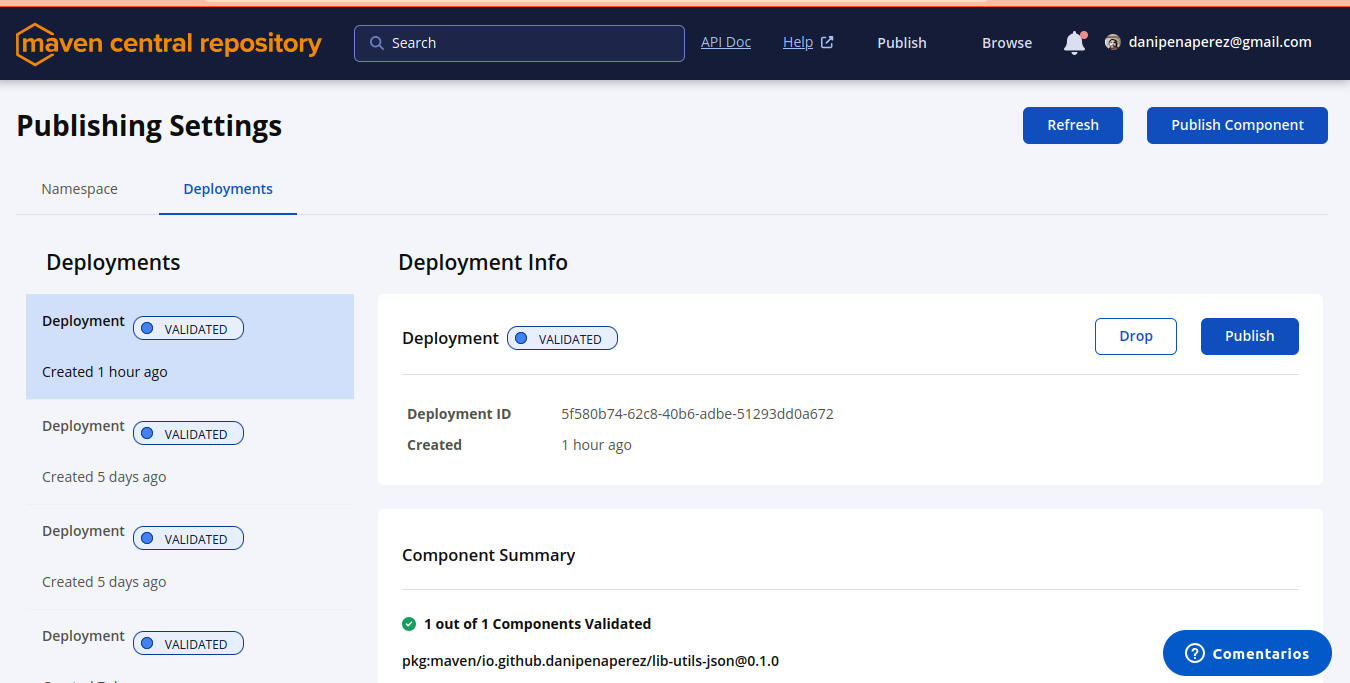
As a last step you must go to your artifactory profile and click on the publish button of your deployment:
3. PROFILES
As you can imagine, whenever we want to do a mvn clean install we don’t want to be signing the artifact, only in deploy phases, etc. That’s why it is recommended to encapsulate the execution of the plugins that we have added in previous sections to a maven profile, so that they only execute when we are interested in performing those tasks.
Here I leave how the final pom.xml has turned out with the profile (ci-cd):
mvn clean deploy -P ci-cd
<?xml version="1.0" encoding="UTF-8"?>
<project
    xmlns="http://maven.apache.org/POM/4.0.0"
    xmlns:xsi="http://www.w3.org/2001/XMLSchema-instance"
    xsi:schemaLocation="http://maven.apache.org/POM/4.0.0 http://maven.apache.org/xsd/maven-4.0.0.xsd">
    <modelVersion>4.0.0</modelVersion>
    <groupId>io.github.danipenaperez</groupId>
    <artifactId>lib-utils-json</artifactId>
    <version>0.0.1</version>
    <url>https://github.com/danipenaperez/lib-utils-json</url>
    <description>Utilities to transform and manage JSON Objects</description>
    <properties>
        <project.build.sourceEncoding>UTF-8</project.build.sourceEncoding>
        <maven.compiler.release>17</maven.compiler.release>
    </properties>
    <licenses>
        <license>
            <name>The Apache License, Version 2.0</name>
            <url>http://www.apache.org/licenses/LICENSE-2.0.txt</url>
        </license>
    </licenses>
    <developers>
        <developer>
            <name>Daniel Peña</name>
            <email>danipenaperez@gmail.com</email>
            <organization>DPPWare</organization>
            <organizationUrl>https://github.com/danipenaperez</organizationUrl>
        </developer>
    </developers>
    <scm>
        <connection>scm:git:git://github.com/danipenaperez/lib-utils-json.git</connection>
        <developerConnection>
            scm:git:ssh://github.com:danipenaperez/lib-utils-json.git</developerConnection>
        <url>http://github.com/danipenaperez/lib-utils-json/tree/master</url>
    </scm>
    <!-- GENERAL BUILD-->
    <build>
        <plugins>
            <plugin>
                <artifactId>maven-surefire-plugin</artifactId>
                <version>2.22.2</version>
            </plugin>
            <plugin>
                <artifactId>maven-compiler-plugin</artifactId>
                <version>3.10.1</version>
            </plugin>
        </plugins>
    </build>


    <profiles>
        <profile>
            <id>ci-cd</id>
            <build>
                <plugins>
                    <plugin>
                        <groupId>org.apache.maven.plugins</groupId>
                        <artifactId>maven-source-plugin</artifactId>
                        <version>2.2.1</version>
                        <executions>
                            <execution>
                                <id>attach-sources</id>
                                <goals>
                                    <goal>jar-no-fork</goal>
                                </goals>
                            </execution>
                        </executions>
                    </plugin>
                    <plugin>
                        <groupId>org.apache.maven.plugins</groupId>
                        <artifactId>maven-javadoc-plugin</artifactId>
                        <version>2.9.1</version>
                        <executions>
                            <execution>
                                <id>attach-javadocs</id>
                                <goals>
                                    <goal>jar</goal>
                                </goals>
                            </execution>
                        </executions>
                    </plugin>
                    <plugin>
                        <groupId>org.apache.maven.plugins</groupId>
                        <artifactId>maven-gpg-plugin</artifactId>
                        <version>3.2.8</version>
                        <executions>
                            <execution>
                                <id>sign-artifacts</id>
                                <phase>verify</phase>
                                <goals>
                                    <goal>sign</goal>
                                </goals>
                            </execution>
                        </executions>
                    </plugin>

                    <plugin>
                        <groupId>org.sonatype.central</groupId>
                        <artifactId>central-publishing-maven-plugin</artifactId>
                        <version>0.7.0</version>
                        <extensions>true</extensions>
                        <configuration>
                            <publishingServerId>central</publishingServerId>
                            <waitUntil>published</waitUntil>
                        </configuration>
                    </plugin>

                </plugins>

            </build>
        </profile>
    </profiles>


    <distributionManagement>
        <snapshotRepository>
            <id>ossrh</id>
            <url>https://s01.oss.sonatype.org/content/repositories/snapshots</url>
        </snapshotRepository>
        <repository>
            <id>ossrh</id>
            <url>
                https://s01.oss.sonatype.org/service/local/staging/deploy/maven2/</url>
        </repository>
    </distributionManagement>
    <dependencies>
        <dependency>
            <groupId>org.slf4j</groupId>
            <artifactId>slf4j-api</artifactId>
            <version>2.0.7</version>
        </dependency>
        <dependency>
            <groupId>ch.qos.logback</groupId>
            <artifactId>logback-classic</artifactId>
            <version>1.4.7</version>
            <scope>runtime</scope>
            <optional>true</optional>
        </dependency>
        <dependency>
            <groupId>org.junit.jupiter</groupId>
            <artifactId>junit-jupiter-engine</artifactId>
            <version>5.9.3</version>
            <scope>test</scope>
        </dependency>
    </dependencies>
</project>