OpenRewrite, What is it, what is it for?
1. What does it cover?
It’s a software that proposes an approach for project maintenance and “modernization” (updating).
That is:
- If today there are improvements in the framework my code uses, I want to be able to update
- If there are security improvements in my components, I want to be able to update
- If there are bugs that have been detected in the components I use, I want to be able to update
- Etc…
2. How does it do it?
It’s based on the Recipe concept. Just like your grandmother’s recipes, a recipe that contains steps.
For example, if we work with Spring Security 5.4 and want to move to version 5.5, we would usually go to the official page where we would find a changelog and migration guides.
In this case, let’s say:
- Update the dependency
- Update the Java objects we’re using: They can be objects that have been replaced, invocations that now have more parameters, etc… whatever it is.
- Update properties in our configuration files (properties/yaml).
The Recipe concept would integrate all the necessary information to perform those steps, so that we only have to worry about passing that recipe to our project and the recipe would take care of doing all those steps for us.
3. Who does it?:
It’s called OpenRewrite because it’s an open source project, where framework/library/etc developers dedicate themselves to writing the necessary recipes needed for migrations of the tools they have developed.
For example, the Spring Boot people, every time they make an update to their framework, write the associated recipe to perform that migration.
-
Spring Framework: Here we can see their repo and explore their Recipes https://github.com/openrewrite/rewrite-spring
-
Quarkus: The Quarkus folks also https://github.com/openrewrite/rewrite-quarkus
-
GitHub Actions: Does your project use GitHub Actions? and they’ve changed the API, no problem, there are recipes for that https://docs.openrewrite.org/recipes/github
-
Kubernetes: No problem, we have recipes to migrate Kubernetes or fix/modify things we don’t have quite right https://docs.openrewrite.org/recipes/kubernetes
-
And many more…
The OpenRewrite core itself writes recipes for common migrations that don’t belong to any framework https://github.com/openrewrite/rewrite.
We can find them here:
-
Maven migrations and manipulations https://github.com/openrewrite/rewrite/tree/main/rewrite-maven/src/main/java/org/openrewrite/maven
-
J2EE 9 migrations https://github.com/openrewrite/rewrite/tree/main/rewrite-java
-
YAML modifications https://github.com/openrewrite/rewrite/tree/main/rewrite-yaml
-
And many more
Popular recipes:
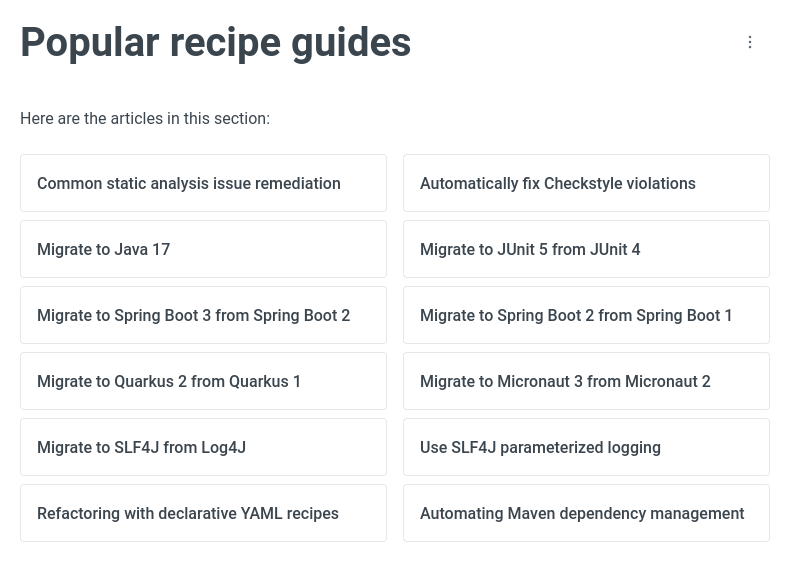
On the OpenRewrite page itself there’s a section that offers us the most common recipes which tend to be the most searched:
https://docs.openrewrite.org/running-recipes/popular-recipe-guides
 .
.
Custom recipes:
Not only can we benefit from the recipes others write, but we can also write our own recipes.
If we need specific steps to update our projects (for example, we change objects in libs, invocations, etc…) We can write our recipes and execute them.
How is it executed?
The OpenRewrite core is execution as a Maven-plugin, so we can use it in the usual way we execute a maven-plugin.
The Moderne.io people also offer a SaaS https://www.moderne.io/ that offers everything the core offers but in a massive way, which is exactly what we’re interested in, passing recipes to as many repositories as we have to keep them always updated.
The SaaS product is paid, and its configuration is basic; we give it credentials to access our GIT repositories and it will take care of keeping everything updated and passing the recipes we indicate autonomously. It offers statistics and countless things as you can imagine.
How does it work?
Traditionally, Java AST (Abstract Syntax Tree) was used for manipulating and creating nodes that would form a Java file.
With it, we were able to make isolated transformations, that is, we had no context of whether our Java file makes sense or relates to other elements within our project.
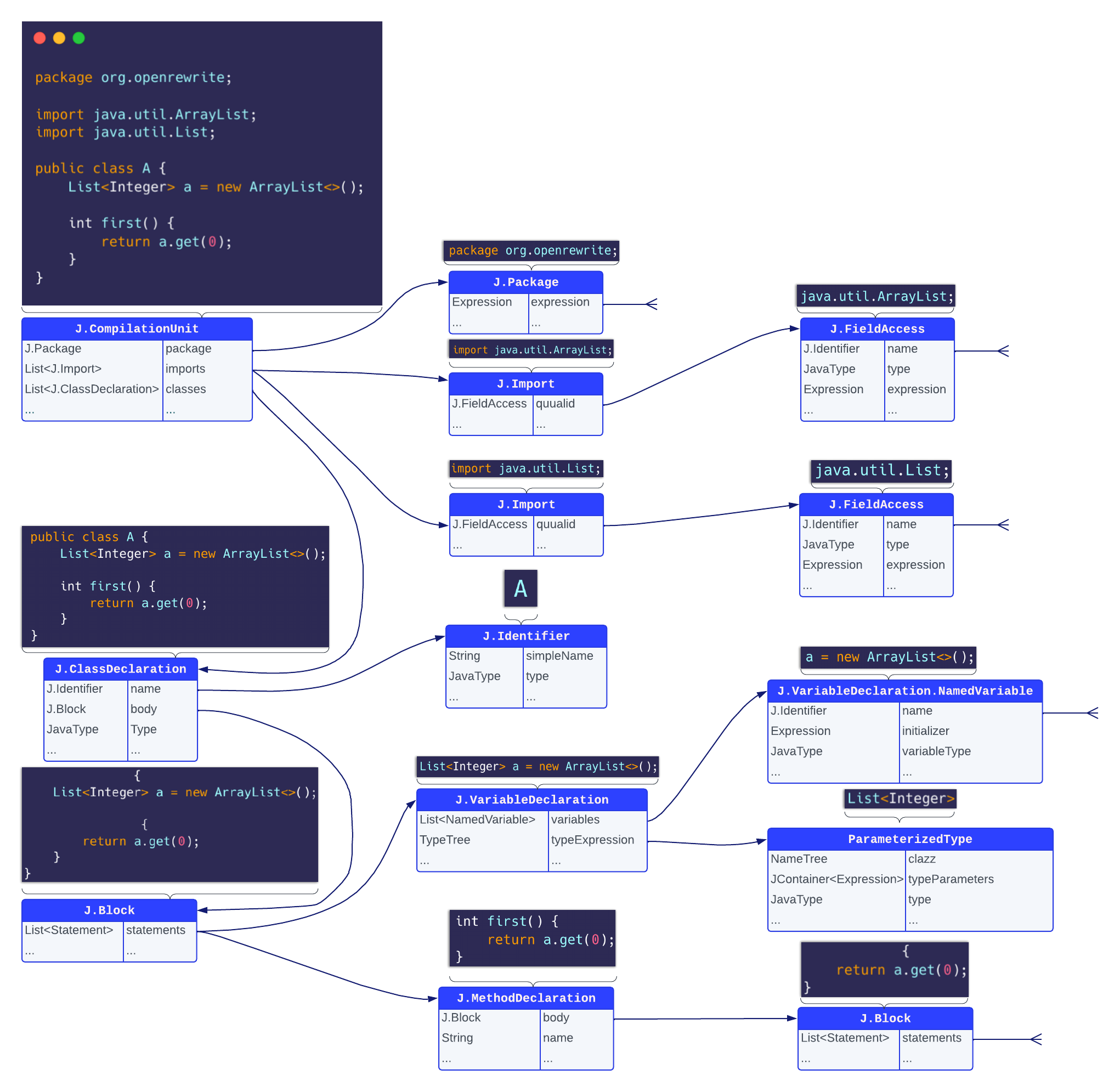
OpenRewrite is based on Lossless Semantic Trees. This approach is not only capable of transforming our Java code, but is also capable of interpreting the context and relationships between the different elements of our project, that is, it understands the semantics of the code it analyzes.
LST builds the relationship tree of code blocks by mounting a relationship structure.
https://docs.openrewrite.org/concepts-explanations/lst-examples
So we see not only that it reads the code and knows what a variable is and where it’s written, but also knows where it’s being used and referenced. The same with methods, constructors and other code elements:
2 Simple examples
Through several simple examples that you can follow along on your computer, we’re going to try some public recipes and write some of our own.
2.1.2 Preparing the guinea pig
All the code for this demo can be found in this repository https://github.com/deadveloper666/openrewrite-tutorial
In the demo1 branch we’ll find 2 main folders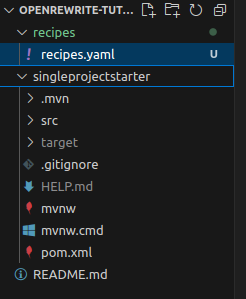
The recipes folder will contain our recipes The singleprojectstarter folder is a project made with SpringInitializer with version Spring boot 2.7.9 and java 11
REWRITE-MAVEN
As I commented before, there are many recipe “providers”, in the following examples we’re going to use recipes from rewrite-maven. These recipes are focused only on pom file modifications.
- Maven migrations and manipulations https://github.com/openrewrite/rewrite/tree/main/rewrite-maven/src/main/java/org/openrewrite/maven
2.2 Using the first recipe
If we look, the parent it brings is Spring Boot’s (2.7.9 and Java 11)
Now let’s look for a recipe that can change the parent in the available recipes in the official OpenRewrite repo:
Among the pre-made maven recipes https://docs.openrewrite.org/recipes/maven/ I see there’s one to change the parent https://docs.openrewrite.org/recipes/maven/changeparentpom
We see that the recipe is parameterized so we edit the recipes.yml file with this content in the recipes folder of the repo:
So we write the first recipe:
---
type: specs.openrewrite.org/v1beta/recipe
name: com.openrewrite.demo.Recipe1
displayName: Some recipe examples
recipeList:
  - org.openrewrite.maven.ChangeParentPom:
      oldGroupId: org.springframework.boot
      newGroupId: org.springframework.boot
      oldArtifactId: spring-boot-starter-parent
      newArtifactId: spring-boot-starter-parent
      newVersion: 2.7.13
There are general parameters we must specify for the recipe book we’re creating:
---
type: specs.openrewrite.org/v1beta/recipe
name: com.openrewrite.demo.Recipe1
displayName: Some recipe examples
recipeList:
RecipeList
In this case our recipe book has a single recipe of type org.openrewrite.maven.ChangeParentPom which is a parameterized recipe:
---
type: specs.openrewrite.org/v1beta/recipe
name: com.openrewrite.demo.Recipe1
displayName: Some recipe examples
recipeList:
  - org.openrewrite.maven.ChangeParentPom:
      oldGroupId: org.springframework.boot
      newGroupId: org.springframework.boot
      oldArtifactId: spring-boot-starter-parent
      newArtifactId: spring-boot-starter-parent
      newVersion: 2.7.13
- oldGroupId: A pain because it’s not optional (you have to know it, it’s not bad because this way you don’t mess up…anyway…)
- oldArtifactId: Maven coordinates
- newGroupId: Target Maven coordinates
- newArtifactId: Target Maven coordinates
- newVersion: Artifact version
Executing the recipe on the project**
As we indicated at the beginning, we’re going to use the rewrite-maven-plugin and therefore we need to be in the project directory where we’re going to execute the plugin.
cd singleprojectstarter

mvn -U org.openrewrite.maven:rewrite-maven-plugin:run \
-Drewrite.recipeArtifactCoordinates=org.openrewrite:rewrite-maven:8.1.2 \
-Drewrite.activeRecipes=com.openrewrite.demo.Recipe1 \
-Drewrite.configLocation=../recipes/recipes.yaml
-
recipeArtifactCoordinates: refers to the maven dependencies we need to execute our recipe. In this case, since in the RecipeList we’re using org.openrewrite.maven.ChangeParentPom we need to bring the artifact that contains that recipe. That recipe is packaged in org.openrewrite:rewrite-maven:8.1.2. If we had created a recipe ourselves, we would need to include in recipeArtifactCoordinates the maven coordinates of our artifact
-
activeRecipes: The recipes (comma-separated) that we’re going to execute. Refers to the name field of our recipe book
-
configLocation: is optional, but in our case since we’re writing the recipe (activeRecipes) ourselves, we must indicate where it can find the recipe definition, that’s why we put the path to the file.
Multi-module projects
When our project is multi-module, it’s necessary that the configLocation path be absolute, since the recipe will be executed for the parent maven module and all its child modules. If the path were relative, when the plugin execution enters the child module it wouldn’t match, so by putting the absolute path we avoid problems.
The end of execution shows us a summary of the recipes executed and the changes:
...
[INFO] Validating active recipes...
[INFO] Project [singleprojectstarter] Resolving Poms...
[INFO] Project [singleprojectstarter] Parsing source files
[INFO] Running recipe(s)...
[WARNING] Changes have been made to singleprojectstarter/pom.xml by:
[WARNING]     com.openrewrite.demo.Recipe1
[WARNING]         org.openrewrite.maven.ChangeParentPom: {oldGroupId=org.springframework.boot, newGroupId=org.springframework.boot, oldArtifactId=spring-boot-starter-parent, newArtifactId=spring-boot-starter-parent, newVersion=2.7.13}
[WARNING] Please review and commit the results.
[WARNING] Estimate time saved: 5m
[INFO] ------------------------------------------------------------------------
[INFO] BUILD SUCCESS
[INFO] ------------------------------------------------------------------------
[INFO] Total time:  5.911 s
[INFO] Finished at: 2024-05-30T12:39:43+02:00
...
We can see the diff and see the changes it made:
--- a/singleprojectstarter/pom.xml
+++ b/singleprojectstarter/pom.xml
@@ -5,7 +5,7 @@
        <parent>
                <groupId>org.springframework.boot</groupId>
                <artifactId>spring-boot-starter-parent</artifactId>
-               <version>2.7.9</version>
+               <version>2.7.13</version>
                <relativePath/> <!-- lookup parent from repository -->
        </parent>
It’s not much, but we’ve already executed a parameterized recipe
2.3 Recap
We’ve seen that: - There are recipes that do things - Many are public - Recipes can be parameterized - We execute them as a maven plugin indicating the recipe configuration parameter.
3. Updating project Parent
Now I’m going to tell it to upgrade me to the latest Spring Boot version, for example to version 3.
In the previous example we also upgraded versions, but the recipe was ChangeParentPom, since we didn’t change the groupId or artifactId, we didn’t change the parent, we updated it.
For this we have pre-compiled recipes from rewrite-maven-plugin, here we have it https://docs.openrewrite.org/recipes/maven/upgradeparentversion
This recipe is more correct for this purpose and if we look at its parameterization it doesn’t allow changing the groupId or artifactId. It only has 3 parameters that indicate that if the project’s parent has that groupId and that artifactId it should migrate it to the new version 3.1.0.
So we add another step to our recipe com.openrewrite.demo.Recipe1, to execute org.openrewrite.maven.UpgradeParentVersion.
We indicate the version we want to upgrade to accepts semantic version, so we indicate the latest version.
It will look like this:
---
type: specs.openrewrite.org/v1beta/recipe
name: com.openrewrite.demo.Recipe1
displayName: Change Maven Parent Pom
recipeList:
- org.openrewrite.maven.ChangeParentPom:
oldGroupId: org.springframework.boot
newGroupId: org.springframework.boot
oldArtifactId: spring-boot-starter-parent
newArtifactId: spring-boot-starter-parent
newVersion: 2.7.13
- org.openrewrite.maven.UpgradeParentVersion:
      groupId: org.springframework.boot
      artifactId: spring-boot-starter-parent
      newVersion: 3.1.0
We reset the changes (git stash) and let’s see the recipes execute in order:
and since the recipe name hasn’t changed, we execute the same thing again:
mvn -U org.openrewrite.maven:rewrite-maven-plugin:run \
-Drewrite.recipeArtifactCoordinates=org.openrewrite:rewrite-maven:8.1.2 \
-Drewrite.activeRecipes=com.openrewrite.demo.Recipe1 \
-Drewrite.configLocation=../recipes/recipes.yaml
...
[INFO] Validating active recipes...
[INFO] Project [singleprojectstarter] Resolving Poms...
[INFO] Project [singleprojectstarter] Parsing source files
[INFO] Running recipe(s)...
[WARNING] Changes have been made to singleprojectstarter/pom.xml by:
[WARNING] com.openrewrite.demo.Recipe1
[WARNING] org.openrewrite.maven.ChangeParentPom: {oldGroupId=org.springframework.boot, newGroupId=org.springframework.boot, oldArtifactId=spring-boot-starter-parent, newArtifactId=spring-boot-starter-parent, newVersion=2.7.13}
[WARNING] org.openrewrite.maven.UpgradeParentVersion: {groupId=org.springframework.boot, artifactId=spring-boot-starter-parent, newVersion=3.1.0}
[WARNING] Please review and commit the results.
[WARNING] Estimate time saved: 5m
We see it executed the recipeList in order, first it went up to 2.7.9 and in the next step to 3.1.0
If we see the diff we see it upgraded the version (now we have 3.1.0), which was the final snapshot we wanted:
--- a/singleprojectstarter/pom.xml
+++ b/singleprojectstarter/pom.xml
@@ -5,7 +5,7 @@
<parent>
<groupId>org.springframework.boot</groupId>
<artifactId>spring-boot-starter-parent</artifactId>
- <version>2.7.9</version>
+ <version>3.1.0</version>
<relativePath/> <!-- lookup parent from repository -->
</parent>
<groupId>com.dppware</groupId>
We do git stash to return to the initial snapshot
4. Updating properties
We find another property update or addition recipe https://docs.openrewrite.org/recipes/maven/addproperty. We’re going to use it to upgrade to Java 17.
In this case we don’t want it associated with the com.openrewrite.demo.ChangeParentPom recipe, we want to have it in the recipe book, but separate to be able to execute it in isolation.
So in the same file we add “—” to indicate these are parameters of another recipe and add our data.
The final file will look like this:
---
type: specs.openrewrite.org/v1beta/recipe
name: com.openrewrite.demo.Recipe1
displayName: Change Maven Parent Pom
recipeList:
  - org.openrewrite.maven.ChangeParentPom:
      oldGroupId: org.springframework.boot
      newGroupId: org.springframework.boot
      oldArtifactId: spring-boot-starter-parent
      newArtifactId: spring-boot-starter-parent
      newVersion: 2.7.13
  - org.openrewrite.maven.UpgradeParentVersion:
      groupId: org.springframework.boot
      artifactId: spring-boot-starter-parent
      newVersion: 3.1.0
---
type: specs.openrewrite.org/v1beta/recipe
name: com.openrewrite.demo.Recipe2
displayName: Update java property to 17
recipeList:
- org.openrewrite.maven.AddProperty:
key: java.version
value: 17
preserveExistingValue: false
trustParent: false
Now let’s execute the com.openrewrite.demo.UpdateJava17 recipe that we see makes use of the internal recipe org.openrewrite.maven.AddProperty:
mvn -U org.openrewrite.maven:rewrite-maven-plugin:run \
 -Drewrite.recipeArtifactCoordinates=org.openrewrite:rewrite-maven:8.1.2 \
 -Drewrite.activeRecipes=com.openrewrite.demo.Recipe2 \
 -Drewrite.configLocation=../recipes/recipes.yaml

[INFO] Validating active recipes...
[INFO] Project [singleprojectstarter] Resolving Poms...
[INFO] Project [singleprojectstarter] Parsing source files
[INFO] Running recipe(s)...
[WARNING] Changes have been made to singleprojectstarter/pom.xml by:
[WARNING]     com.openrewrite.demo.Recipe2
[WARNING]         org.openrewrite.maven.AddProperty: {key=java.version, value=17, preserveExistingValue=false, trustParent=false}
[WARNING] Please review and commit the results.
[WARNING] Estimate time saved: 5m
[INFO] ------------------------------------------------------------------------
[INFO] BUILD SUCCESS
@@ -14,7 +14,7 @@
        <name>singleprojectstarter</name>
        <description>Demo project for Spring Boot</description>
        <properties>
-               <java.version>11</java.version>
+               <java.version>17</java.version>
        </properties>
        <dependencies>
5. Adding dependencies
Let’s give it a web nature by adding spring-boot-starter-web.
We find the recipe https://docs.openrewrite.org/recipes/maven/adddependency.
And since this recipe has its own entity, we create a definition with the name com.openrewrite.demo.AddWebNature in our configuration file We add:
---
type: specs.openrewrite.org/v1beta/recipe
name: com.openrewrite.demo.AddWebNature
displayName: Add Web nature
recipeList:
  - org.openrewrite.maven.AddDependency:
      groupId: org.springframework.boot
      artifactId: spring-boot-starter-web
      version: 3.1.0
      onlyIfUsing: org.springframework.boot.*
      scope: compile
      acceptTransitive: true
version: We could have specified the version by putting it manually (semver) or acceptTransitive if the parent brings it, which is what happens in our case. If we had wanted to use a specific one because it had a fix we could have put it specifically.
onlyIfUsing: This plugin is so smart it’s confusing, the onlyIfUsing parameter indicates that that dependency will only be included if our code is using the indicated package. So that we don’t have imports that aren’t used.
The LST tree is very smart
Maybe sometimes we want to have the dependency but we don’t use it in code. So well, in this case I’m tricking it by indicating that I do have an import of org.springframework.boot in the Application.java class. This way OpenRewrite when building the tree will see that that import is being used and then it will execute the recipe adding the dependency.
And we execute the com.openrewrite.demo.AddWebNature recipe:
mvn -U org.openrewrite.maven:rewrite-maven-plugin:run \
 -Drewrite.recipeArtifactCoordinates=org.openrewrite:rewrite-maven:8.1.2 \
 -Drewrite.activeRecipes=com.openrewrite.demo.AddWebNature \
 -Drewrite.configLocation=../recipes/recipes.yaml


[INFO] Running recipe(s)...
[WARNING] Changes have been made to singleprojectstarter/pom.xml by:
[WARNING]     com.openrewrite.demo.AddWebNature
[WARNING]         org.openrewrite.maven.AddDependency: {groupId=org.springframework.boot, artifactId=spring-boot-starter-web, version=3.1.0, scope=compile, onlyIfUsing=org.springframework.boot.*, acceptTransitive=true}
[WARNING] Please review and commit the results.
[WARNING] Estimate time saved: 5m
        </properties>
        <dependencies>
                <dependency>
                        <groupId>org.springframework.boot</groupId>
                        <artifactId>spring-boot-starter</artifactId>
                </dependency>
+               <dependency>
+                       <groupId>org.springframework.boot</groupId>
+                       <artifactId>spring-boot-starter-web</artifactId>
+               </dependency>

                <dependency>
6. Removing dependencies
Let’s imagine we need to roll back a version of a certain lib because it has a bug.
We’re going to call it WebErrorWorkAround (com.openrewrite.demo.WebErrorWorkAround)
In our intervention we need to do these steps: 1. We need to delete version 2. Add another version of the lib 3. Add a comment in the pom.xml indicating the reason for that change
We use the delete step and the add step in that order
The recipe will look like this (we add it to the recipe book):
---
type: specs.openrewrite.org/v1beta/recipe
name: com.openrewrite.demo.WebErrorWorkAround
displayName: Workaround for Web error on latest version
recipeList:
  - org.openrewrite.maven.RemoveDependency:
      groupId: org.springframework.boot
      artifactId: spring-boot-starter-web
      scope: compile
  - org.openrewrite.maven.AddDependency:
      groupId: org.springframework.boot
      artifactId: spring-boot-starter-web
      version: 3.1.1
      scope: runtime
      onlyIfUsing: org.springframework.boot.test.context.*
      type: jar
      classifier: ''
      optional: null
      acceptTransitive: false
  - org.openrewrite.maven.AddCommentToMavenDependency:
      xPath: /project/dependencies/dependency
      groupId: org.springframework.boot
      artifactId: spring-boot-starter-web
      commentText: This is excluded due to CVE <X> and will be removed when we upgrade the next version is available.
As we can see, we remove starter-web, add starter-web in another version, and add a comment to the pom.xml indicating why this change was made using the public recipe org.openrewrite.maven.AddCommentToMavenDependency.
We execute:
And we execute the com.openrewrite.demo.WebErrorWorkAround recipe:
mvn -U org.openrewrite.maven:rewrite-maven-plugin:run \
 -Drewrite.recipeArtifactCoordinates=org.openrewrite:rewrite-maven:8.1.2 \
 -Drewrite.activeRecipes=com.openrewrite.demo.WebErrorWorkAround \
  -Drewrite.configLocation=../recipes/recipes.yaml

[INFO] Running recipe(s)...
[WARNING] Changes have been made to singleprojectstarter/pom.xml by:
[WARNING]     com.openrewrite.demo.WebErrorWorkAround
[WARNING]         org.openrewrite.maven.RemoveDependency: {groupId=org.springframework.boot, artifactId=spring-boot-starter-web, scope=compile}
[WARNING]         org.openrewrite.maven.AddDependency: {groupId=org.springframework.boot, artifactId=spring-boot-starter-web, version=3.1.1, scope=runtime, onlyIfUsing=org.springframework.boot.test.context.*, type=jar, classifier=, acceptTransitive=false}
[WARNING]         org.openrewrite.maven.AddCommentToMavenDependency: {xPath=/project/dependencies/dependency, groupId=org.springframework.boot, artifactId=spring-boot-starter-web, commentText=This is excluded due to CVE <X> and will be removed when we upgrade the next version is available.}
[WARNING] Please review and commit the results.
[WARNING] Estimate time saved: 5m
        <dependencies>
                <dependency>
                        <groupId>org.springframework.boot</groupId>
                        <artifactId>spring-boot-starter</artifactId>
                </dependency>
+               <dependency>
+                       <!--This is excluded due to CVE <X> and will be removed when we upgrade the next version is available.-->
+                       <groupId>org.springframework.boot</groupId>
+                       <artifactId>spring-boot-starter-web</artifactId>
+                       <version>3.1.1</version>
+                       <classifier></classifier>
+                       <scope>runtime</scope>
+               </dependency>
Recap
If you got lost, the total content of our recipes.yaml is this:
docker-compose.yaml
Up to here we’ve seen how in a Maven project we can execute recipes and we’ve seen some of the Common Recipes, how to configure them and how to execute them. In the next step we’re going to see Spring Framework specific recipes
7. REWRITE-SPRING
Spring is a highly known and used framework, therefore we’ll have much interest in its recipes, since Spring developers are going to facilitate migrations and maintenance for us.
All official Spring recipes are documented at https://docs.openrewrite.org/recipes/java/spring
Among the most popular recipes https://docs.openrewrite.org/running-recipes/popular-recipe-guides we find one that migrates from Spring Boot 2 to Spring Boot 3, in current times more than one will have this migration pending, so let’s see how this recipe behaves in a Spring Boot 2 project and pass it to version 3.
7.1 Test preparation (No tricks or cheating)
We’re going to take an old Spring Boot 2 project and we’re going to pass it to 3 and so you can see how it works without “tricks” (you’ll understand later) we’re going to take a random project from the many tutorial ones on the internet and we’re going to execute several recipes on it to see if this OpenRewrite thing is so magical or not so magical and if it’s all that glitters is gold or not…
We put any tutorial in Google “spring boot simple crud application”
The first one that comes up is this: https://www.javatpoint.com/spring-boot-crud-operations We look for the word “download” and download a zip with the project:
The zip link is this: https://static.javatpoint.com/springboot/download/spring-boot-crud-operation.zip
cd project
wget https://static.javatpoint.com/springboot/download/spring-boot-crud-operation.zip
unzip spring-boot-crud-operation.zip
rm spring-boot-crud-operation.zip
cd spring-boot-crud-operation
We see its pom and see it’s in version 2.
    <parent>
        <groupId>org.springframework.boot</groupId>
        <artifactId>spring-boot-starter-parent</artifactId>
        <version>2.3.0.M1</version>
        <relativePath/> <!-- lookup parent from repository -->
    </parent>
- We insert
```sh curl -X POST http://localhost:8080/books \ -H ‘Content-Type: application/json’ \ -d ‘{ “bookid”: “5433”,”bookname”: “Core and Advance Java”, “author”: “R. Nageswara Rao”, “price”: “800” } ’
The starting point is apparently good, excellent!!
7.2 Strategy
The migration will consist of these steps:
- Java 17 all the way (we’ll use this recipe https://docs.openrewrite.org/recipes/java/migrate/javaversion17)
- Change to J2EE 9 (jakarta) javax to jakarta (https://docs.openrewrite.org/recipes/java/migrate/jakarta/javaxmigrationtojakarta)
- Spring Boot parent from Spring Boot 2 to Spring Boot 3 (https://docs.openrewrite.org/recipes/java/spring/boot3/upgradespringboot_3_0)
- Change in controllers
- Change in JPA entities (Hibernate 5 to Hibernate 6)
It’s very ambitious, since it’s a very large update that we can’t do in steps, because once we change the parent everything will break. For example if we change Java to Java 17 and do clean install, it will give us a class version error, so we need to do everything in one step, starting from the project that currently compiles.
OPEN REWRITE only works from projects that compile, otherwise it couldn’t analyze the semantics of invocations.
We write a new recipe recipes/recipe_spring_migration.yaml to do everything in one transaction:
type: specs.openrewrite.org/v1beta/recipe
name: com.openrewrite.demo.SpringMigration
displayName: Migrate Spring boot project
recipeList:
  - org.openrewrite.java.migrate.UpgradeToJava17
  - org.openrewrite.java.migrate.jakarta.JavaxMigrationToJakarta
  - org.openrewrite.java.spring.boot3.UpgradeSpringBoot_3_0
As we see the recipes belong to different artifacts, - java/migrate/javaversion17: belongs to org.openrewrite.recipe:rewrite-migrate-java - java/migrate/jakarta/javaxmigrationtojakarta also belongs to org.openrewrite.recipe:rewrite-migrate-java - spring/boot3/upgradespringboot_3_0 belongs to the artifact org.openrewrite.recipe:rewrite-spring
So the plugin execution is left indicating all the coordinates of the artifacts that contain the recipes we’re going to use:
mvn -U org.openrewrite.maven:rewrite-maven-plugin:run \
 -Drewrite.recipeArtifactCoordinates=org.openrewrite.recipe:rewrite-migrate-java:LATEST,org.openrewrite.recipe:rewrite-spring:LATEST \
 -Drewrite.activeRecipes=com.openrewrite.demo.SpringMigration \
 -Drewrite.configLocation=../recipes/recipe_spring_migration.yaml
We execute and see that many tasks have been executed. We can appreciate that there are tasks that are dependent on others:
[INFO] Validating active recipes...
[INFO] Project [spring-boot-crud-operation] Resolving Poms...
[INFO] Project [spring-boot-crud-operation] Parsing source files
[INFO] Running recipe(s)...
[WARNING] Changes have been made to project/spring-boot-crud-operation/pom.xml by:
[WARNING]     com.openrewrite.demo.SpringMigration
[WARNING]         org.openrewrite.java.migrate.UpgradeToJava17
[WARNING]             org.openrewrite.java.migrate.Java8toJava11
[WARNING]                 org.openrewrite.java.migrate.JavaVersion11
[WARNING]                     org.openrewrite.java.migrate.UpgradeJavaVersion: {version=11}
[WARNING]                 org.openrewrite.java.migrate.javax.AddJaxbDependencies
[WARNING]                     org.openrewrite.java.migrate.javax.AddJaxbRuntime: {runtime=glassfish}
[WARNING]                         org.openrewrite.java.migrate.javax.AddJaxbRuntime$AddJaxbRuntimeMaven
[WARNING]             org.openrewrite.java.migrate.JavaVersion17
[WARNING]                 org.openrewrite.java.migrate.UpgradeJavaVersion: {version=17}
[WARNING]         org.openrewrite.java.spring.boot3.UpgradeSpringBoot_3_0
[WARNING]             org.openrewrite.java.spring.boot2.UpgradeSpringBoot_2_7
[WARNING]                 org.openrewrite.java.spring.boot2.UpgradeSpringBoot_2_6
[WARNING]                     org.openrewrite.java.spring.boot2.UpgradeSpringBoot_2_5
[WARNING]                         org.openrewrite.java.spring.boot2.UpgradeSpringBoot_2_4
[WARNING]                             org.openrewrite.java.spring.boot2.UpgradeSpringBoot_2_3
[WARNING]                                 org.openrewrite.maven.UpgradeParentVersion: {groupId=org.springframework.boot, artifactId=spring-boot-starter-parent, newVersion=2.3.x}
[WARNING]                             org.openrewrite.maven.UpgradeParentVersion: {groupId=org.springframework.boot, artifactId=spring-boot-starter-parent, newVersion=2.4.x}
[WARNING]                             org.openrewrite.maven.RemoveExclusion: {groupId=org.springframework.boot, artifactId=spring-boot-starter-test, exclusionGroupId=org.junit.vintage, exclusionArtifactId=junit-vintage-engine}
[WARNING]                         org.openrewrite.maven.UpgradeParentVersion: {groupId=org.springframework.boot, artifactId=spring-boot-starter-parent, newVersion=2.5.x}
[WARNING]                     org.openrewrite.maven.UpgradeParentVersion: {groupId=org.springframework.boot, artifactId=spring-boot-starter-parent, newVersion=2.6.x}
[WARNING]                 org.openrewrite.maven.UpgradeParentVersion: {groupId=org.springframework.boot, artifactId=spring-boot-starter-parent, newVersion=2.7.x, retainVersions=[mysql:mysql-connector-java]}
[WARNING]             org.openrewrite.maven.UpgradeParentVersion: {groupId=org.springframework.boot, artifactId=spring-boot-starter-parent, newVersion=3.0.x, retainVersions=[org.thymeleaf:thymeleaf-spring5, org.thymeleaf.extras:thymeleaf-extras-springsecurity5]}
[WARNING] Changes have been made to project/spring-boot-crud-operation/src/main/java/com/javatpoint/model/Books.java by:
[WARNING]     com.openrewrite.demo.SpringMigration
[WARNING]         org.openrewrite.java.migrate.UpgradeToJava17
[WARNING]             org.openrewrite.java.migrate.Java8toJava11
[WARNING]                 org.openrewrite.java.migrate.JavaVersion11
[WARNING]                     org.openrewrite.java.migrate.UpgradeJavaVersion: {version=11}
[WARNING]             org.openrewrite.java.migrate.JavaVersion17
[WARNING]                 org.openrewrite.java.migrate.UpgradeJavaVersion: {version=17}
[WARNING]         org.openrewrite.java.migrate.jakarta.JavaxMigrationToJakarta
[WARNING]             org.openrewrite.java.migrate.jakarta.JavaxPersistenceToJakartaPersistence
[WARNING]                 org.openrewrite.java.ChangePackage: {oldPackageName=javax.persistence, newPackageName=jakarta.persistence, recursive=true}
[WARNING] Changes have been made to project/spring-boot-crud-operation/src/main/java/com/javatpoint/controller/BooksController.java by:
[WARNING]     com.openrewrite.demo.SpringMigration
[WARNING]         org.openrewrite.java.migrate.UpgradeToJava17
[WARNING]             org.openrewrite.java.migrate.Java8toJava11
[WARNING]                 org.openrewrite.java.migrate.JavaVersion11
[WARNING]                     org.openrewrite.java.migrate.UpgradeJavaVersion: {version=11}
[WARNING]             org.openrewrite.java.migrate.JavaVersion17
[WARNING]                 org.openrewrite.java.migrate.UpgradeJavaVersion: {version=17}
[WARNING]         org.openrewrite.java.spring.boot3.UpgradeSpringBoot_3_0
[WARNING]             org.openrewrite.java.spring.boot2.UpgradeSpringBoot_2_7
[WARNING]                 org.openrewrite.java.spring.boot2.UpgradeSpringBoot_2_6
[WARNING]                     org.openrewrite.java.spring.boot2.UpgradeSpringBoot_2_5
[WARNING]                         org.openrewrite.java.spring.boot2.UpgradeSpringBoot_2_4
[WARNING]                             org.openrewrite.java.spring.boot2.UpgradeSpringBoot_2_3
[WARNING]                                 org.openrewrite.java.spring.boot2.UpgradeSpringBoot_2_2
[WARNING]                                     org.openrewrite.java.spring.boot2.UpgradeSpringBoot_2_1
[WARNING]                                         org.openrewrite.java.spring.boot2.UpgradeSpringBoot_2_0
[WARNING]                                             org.openrewrite.java.spring.boot2.SpringBoot2BestPractices
[WARNING]                                                 org.openrewrite.java.spring.ImplicitWebAnnotationNames
[WARNING] Please review and commit the results.
[INFO] ------------------------------------------------------------------------
[INFO] BUILD SUCCESS
[INFO] ------------------------------------------------------------------------
Let’s see the changes with git diff - We see the new Java version - The latest Spring Boot parent version - The package modification - etc…
We test that it compiles and works: - We see it compiles “mvn clean install” - We start: mvn clean install spring-boot:run -Dspring-boot.run.profiles=local - We launch a curl to see everything is ok
- We insert ```sh curl -X POST http://localhost:8080/books \ -H ‘Content-Type: application/json’ \ -d ‘{ “bookid”: “5433”,”bookname”: “Core and Advance Java”, “author”: “R. Nageswara Rao”, “price”: “800” } ’
We now have our project in Spring Boot 3 Java 17
7.3 Renaming packages
Let’s see how to make this project ours in a simple way, we’ll use the package refactor to change the complete package
We’ll use https://docs.openrewrite.org/recipes/java/changepackage
We add the recipe definition to the configuration file we already had
Since it’s parameterized we prepare our AdaptToDemoPackaging recipe:
---
type: specs.openrewrite.org/v1beta/recipe
name: com.openrewrite.demo.AdaptToDemoPackaging
displayName: An easy day at the office
recipeList:
  - org.openrewrite.java.ChangePackage:
      oldPackageName: com.javatpoint
      newPackageName: com.openrewrite.demo
      recursive: true
mvn -U org.openrewrite.maven:rewrite-maven-plugin:run \
 -Drewrite.recipeArtifactCoordinates=org.openrewrite:rewrite-maven:8.1.2 \
 -Drewrite.activeRecipes=com.openrewrite.demo.AdaptToDemoPackaging \
 -Drewrite.configLocation=../recipes/recipe_spring_migration.yaml

....
[INFO] Project [spring-boot-crud-operation] Resolving Poms...
[INFO] Project [spring-boot-crud-operation] Parsing source files
[INFO] Running recipe(s)...
[WARNING] File has been moved from project/spring-boot-crud-operation/src/main/java/com/javatpoint/SpringBootCrudOperationApplication.java to project/spring-boot-crud-operation/src/main/java/com/dppware/SpringBootCrudOperationApplication.java by:
[WARNING]     com.openrewrite.demo.AdaptToDemoPackaging
[WARNING]         org.openrewrite.java.ChangePackage: {oldPackageName=com.javatpoint, newPackageName=com.openrewrite.demo, recursive=true}
[WARNING] File has been moved from project/spring-boot-crud-operation/src/main/java/com/javatpoint/model/Books.java to project/spring-boot-crud-operation/src/main/java/com/dppware/model/Books.java by:
[WARNING]     com.openrewrite.demo.AdaptToDemoPackaging
[WARNING]         org.openrewrite.java.ChangePackage: {oldPackageName=com.javatpoint, newPackageName=com.openrewrite.demo, recursive=true}
[WARNING] File has been moved from project/spring-boot-crud-operation/src/main/java/com/javatpoint/controller/BooksController.java to project/spring-boot-crud-operation/src/main/java/com/dppware/controller/BooksController.java by:
[WARNING]     com.openrewrite.demo.AdaptToDemoPackaging
[WARNING]         org.openrewrite.java.ChangePackage: {oldPackageName=com.javatpoint, newPackageName=com.openrewrite.demo, recursive=true}
[WARNING] File has been moved from project/spring-boot-crud-operation/src/main/java/com/javatpoint/service/BooksService.java to project/spring-boot-crud-operation/src/main/java/com/dppware/service/BooksService.java by:
[WARNING]     com.openrewrite.demo.AdaptToDemoPackaging
[WARNING]         org.openrewrite.java.ChangePackage: {oldPackageName=com.javatpoint, newPackageName=com.openrewrite.demo, recursive=true}
[WARNING] File has been moved from project/spring-boot-crud-operation/src/main/java/com/javatpoint/repository/BooksRepository.java to project/spring-boot-crud-operation/src/main/java/com/dppware/repository/BooksRepository.java by:
[WARNING]     com.openrewrite.demo.AdaptToDemoPackaging
[WARNING]         org.openrewrite.java.ChangePackage: {oldPackageName=com.javatpoint, newPackageName=com.openrewrite.demo, recursive=true}
[WARNING] File has been moved from project/spring-boot-crud-operation/src/test/java/com/javatpoint/SpringBootCrudOperationApplicationTests.java to project/spring-boot-crud-operation/src/test/java/com/dppware/SpringBootCrudOperationApplicationTests.java by:
[WARNING]     com.openrewrite.demo.AdaptToDemoPackaging
[WARNING]         org.openrewrite.java.ChangePackage: {oldPackageName=com.javatpoint, newPackageName=com.openrewrite.demo, recursive=true}
[WARNING] Please review and commit the results.
7.4 Let’s complicate things
So far they’ve all been “simple” cases and it’s behaved well, but let’s give it a more complicated case.
We go back to the starting point:
7.5 Adding security
We’re going to add security. The project is at 2.3.0, I’m going to upgrade it to 2.7.9 and add the security configuration for that version. It also works for the test because we’re going to upgrade from version 2 to version 3.
Steps we perform to prepare it: Upgrade the spring-boot-parent
Add the security starter to pom.xml <dependency>
<groupId>org.springframework.boot</groupId>
<artifactId>spring-boot-starter-security</artifactId>
</dependency>
and the configuration class, with in-memory users to simplify the example
package com.javatpoint.config;

import org.springframework.context.annotation.Configuration;
import org.springframework.security.config.annotation.authentication.builders.AuthenticationManagerBuilder;
import org.springframework.security.config.annotation.web.builders.HttpSecurity;
import org.springframework.security.config.annotation.web.configuration.EnableWebSecurity;
import org.springframework.security.config.annotation.web.configuration.WebSecurityConfigurerAdapter;

@Configuration
@EnableWebSecurity
public class SecurityConfiguration extends WebSecurityConfigurerAdapter {

    protected void configure(HttpSecurity http) throws Exception {
        http
        .authorizeHttpRequests((authz) -> authz
                .antMatchers("/books").hasRole("ADMIN")
                .antMatchers("/book").hasRole("USER")
        ).csrf().disable()
        .httpBasic();

    }

    // In-memory authentication to authenticate the user i.e. the user credentials are stored in the memory.
    @Override
    protected void configure(AuthenticationManagerBuilder auth) throws Exception {
        auth.inMemoryAuthentication().withUser("guest").password("{noop}guest1234").roles("USER");
        auth.inMemoryAuthentication().withUser("admin").password("{noop}admin1234").roles("ADMIN");
    }
}
We start and verify the starting point compiles and security works ```sh mvn clean install spring-boot:run -Dspring-boot.run.profiles=local
We verify security works because it returns a 401 if we don't indicate security credentials:

 ```sh
curl -X GET http://localhost:8080/book  --> 401
 ```

We verify it works by indicating the Authorization header: Basic Z3Vlc3Q6Z3Vlc3QxMjM0 (auto-generated by curl with basicAuth in the URL):

 ```sh
curl -X GET http://guest:guest1234@localhost:8080/book

 ```

 ```sh
curl -X POST http://admin:admin1234@localhost:8080/books \
   -H 'Content-Type: application/json' \
   -d '{ "bookid": "5433","bookname": "Core and Advance Java", "author": "R. Nageswara Rao", "price": "800" } '
We pass the recipe book to see how it behaves
mvn -U org.openrewrite.maven:rewrite-maven-plugin:run \
 -Drewrite.recipeArtifactCoordinates=org.openrewrite.recipe:rewrite-migrate-java:LATEST,org.openrewrite.recipe:rewrite-spring:LATEST \
 -Drewrite.activeRecipes=com.openrewrite.demo.SpringMigration \
 -Drewrite.configLocation=../recipes/recipe_spring_migration.yaml

WARNING] Changes have been made to project/spring-boot-crud-operation/src/main/java/com/dppware/config/SecurityConfiguration.java by:
NOT EVERYTHING THAT GLITTERS IS GOLD
We analyze the class and see some things it did well and others badly It removed that we extend the WebConfigurerAdapter, but then in code it didn’t go well, it leaves things that don’t compile and the in-memory user migration wasn’t done well.
This recipe was written by someone and it worked for them because they got to publish it. So as we can observe, it works for some cases, but not all recipes work for all cases and since in Spring things can be done in 5 different ways there will be things that work for us and things that don’t
Before continuing let’s leave everything ok
We can’t leave without fixing it, so we’re going to apply the necessary changes we must make on what OpenRewrite left wrong, so that security works in Spring Boot 3: Just change the SecurityConfiguration.java class with this content
package com.javatpoint.config;

import org.springframework.context.annotation.Bean;
import org.springframework.context.annotation.Configuration;
import org.springframework.security.config.annotation.web.builders.HttpSecurity;
import org.springframework.security.config.annotation.web.configuration.EnableWebSecurity;
import org.springframework.security.core.userdetails.User;
import org.springframework.security.core.userdetails.User.UserBuilder;
import org.springframework.security.core.userdetails.UserDetails;
import org.springframework.security.provisioning.InMemoryUserDetailsManager;
import org.springframework.security.web.SecurityFilterChain;

@Configuration
@EnableWebSecurity
public class SecurityConfiguration {

    @Bean
    SecurityFilterChain filterChain(HttpSecurity http) throws Exception {
        http.authorizeHttpRequests((authz) -> authz
                                .requestMatchers("/books").hasRole("ADMIN")
                                .requestMatchers("/book").hasRole("USER")
                )
                .httpBasic()
                .and()
                .csrf().disable()
                ;
        return http.build();

    }

    // In-memory authentication to authenticate the user i.e. the user credentials are stored in the memory.
    @Bean
    InMemoryUserDetailsManager inMemoryAuthManager() throws Exception {


        return new InMemoryUserDetailsManager(User.builder().username("admin").password("{noop}admin1234").roles("ADMIN").build(),
                                        User.builder().username("guest").password("{noop}guest1234").roles("USER").build());
    }
}
It can be started and the curls tested and we see we have the project in Spring Boot 3 with in-memory security.